


What if the loudest error in your logs is only a symptom? Incident investigations often leave teams with abundant events but no clear account of which event triggered the failure, especially when evidence is spread across systems and teams. Logs are essential, but a timestamp or repeated warning isn’t proof of cause.
A disciplined log based root cause analysis connects relevant events, tests whether they support an explanation, and records what remains uncertain. Start with the incident’s impact and time window, then compare the event sequence with other incident details before deciding what the evidence supports. This article shows how to gather and compare evidence, test a proposed cause, and turn findings into corrective actions teams can reuse. It also explains how structured reports that bring logs, timelines, and incident data together can make analysis more consistent across IT roles.
Key Takeaways
- Use log based root cause analysis to distinguish recurring patterns from evidence that supports a plausible cause.
- Set the incident scope, gather relevant logs, arrange events in order, and compare candidate explanations with other incident evidence.
- Record unresolved gaps so teams can see where an explanation is supported and where further investigation is needed.
- Use a consistent report structure to connect the timeline, evidence, cause, confidence, and corrective actions for wider team learning.
What Is Log-Based Root Cause Analysis, and What Can Logs Actually Prove?
Log-based root cause analysis uses recorded system and application events to reconstruct an incident and explain how it unfolded. Investigators examine what happened, when it happened, and which events may be connected. The goal isn’t simply to find an error message. It’s to develop an explanation that accounts for the available evidence. This applies the broader principles of Root Cause Analysis on Wikipedia to the event records created by technical systems.
Logs are evidence of recorded events, not automatic proof of causality. They can show that an event occurred, but they may not reveal what triggered it or whether it caused the incident.
A repeated error, for example, may appear during an outage without being the reason the service failed. Treat each pattern as a lead to investigate, not a conclusion to report.
Why a log pattern is a starting point, not a root cause
Timing can help narrow the investigation. If a service error appears just before a user-facing failure, the sequence suggests a possible connection. But correlation alone doesn’t show that the error caused the failure. It may be a symptom, a separate issue, or a routine event that happened at the same time.
Test the explanation against incident context and other available evidence. Check whether related events support the proposed sequence, whether the explanation fits the impact, and whether another cause could account for the same pattern. Compare timestamps carefully, especially when records come from systems set to different time zones. Evidence that conflicts with the theory should weaken it; missing information should remain visible as a gap. A sound finding distinguishes what the logs confirm from what the team infers, so process managers, IT support staff, and service providers can assess the reasoning rather than inherit an unsupported assumption.
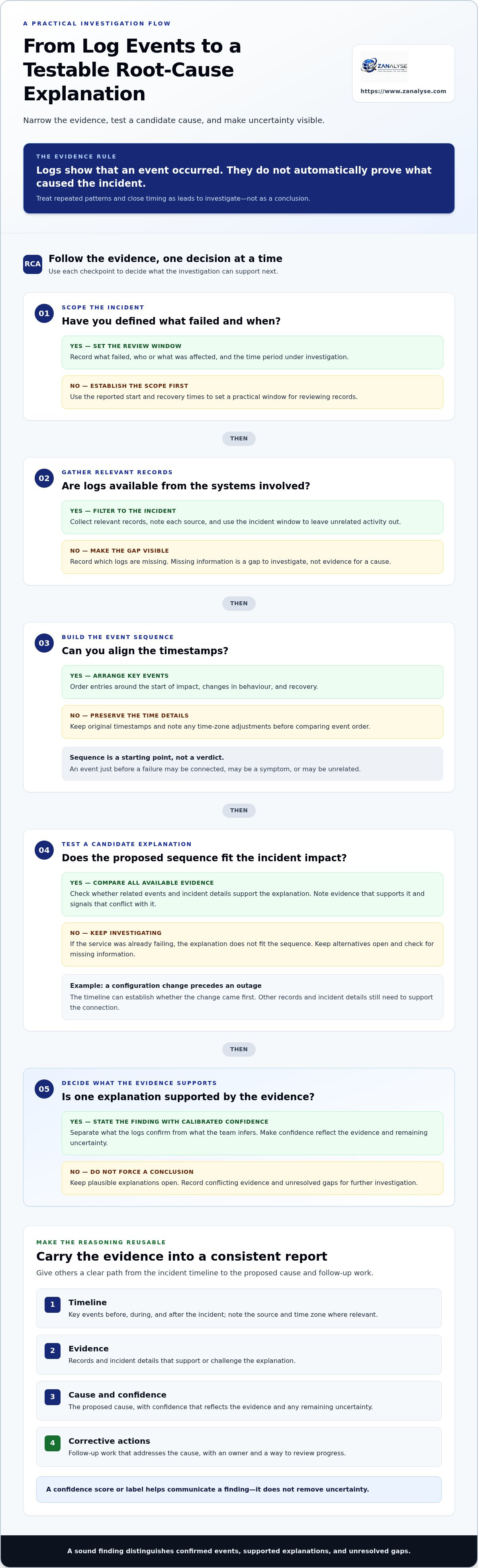
How to Use Logs to Build and Test a Root-Cause Explanation
A reliable investigation narrows the evidence before drawing conclusions. Start with the reported impact, then work through event records in sequence. This keeps log based root cause analysis focused on the incident rather than every warning or error in the surrounding systems.
- Define the scope. Record what failed, who or what was affected, and the time period under investigation. Use the reported start and recovery times to set a practical window for reviewing records.
- Gather relevant logs. Collect records from the systems involved, using the incident window to filter out unrelated activity. Note each source and any missing records so gaps are clear.
- Order the events. Align timestamps and arrange key entries around the start of the impact, changes in behaviour, and recovery. Preserve the original timestamps and note any time-zone adjustments.
- Identify candidate explanations. Look for an event or sequence that could account for the impact, then compare it with other incident evidence. Keep alternative explanations open until the evidence supports ruling them out.
For example, if a service becomes unavailable after a configuration change, the timeline can establish whether the change came first. Then check whether other records or incident details support the connection. If the service was already failing, or the relevant logs are missing, the proposed explanation needs more investigation.
From event sequence to a testable explanation
A timeline shows what preceded and followed the reported impact; it doesn’t settle the cause by itself. For each candidate explanation, record the events that support it, any signals that conflict with it, and the information still missing. State confidence in proportion to the evidence. If several explanations remain plausible, keep them open rather than presenting one as certain. Broader approaches can help teams choose a suitable investigation path, as outlined in these root cause analysis methods.
Teams looking to make this process easier to follow across roles can explore ZANALYSE’s guided RCA platform, which guides users through established RCA techniques.
Turn Log-Based RCA Findings into Consistent Reports and Corrective Actions
An investigation has limited value if its reasoning stays with the people who led it. A useful report gives others a clear path from the incident timeline to the evidence, the proposed cause, and the actions intended to prevent a repeat. For a log based root cause analysis, make the strength of the conclusion visible, not just the conclusion itself.
A practical report structure can capture:
- Timeline: Key events before, during, and after the incident, with the source and time zone noted where relevant.
- Evidence: Records and incident details that support or challenge the explanation.
- Cause and confidence: The proposed cause, with confidence that reflects the evidence and any remaining uncertainty.
- Corrective actions: Changes or follow-up work that address the cause, rather than only the visible symptom. Assign an owner and record how the team will review progress.
Confidence deserves careful wording. A score or label helps readers understand how strongly the evidence supports a finding, but it doesn’t remove uncertainty. The IT incident confidence scoring guide explores how to communicate that distinction. Teams preparing incident documentation can also consult the DORA incident reporting guide for related context; a report alone doesn’t guarantee compliance.
How structured RCA supports broader problem management
ZANALYSE creates structured reports from logs, timelines, and incident data, bringing evidence, confidence scores, and corrective actions into one account. Its guided RCA process helps IT support personnel, process managers, product teams, and service providers follow a consistent approach without making every investigation depend on specialist investigators. Teams can use the resulting reports to review the reasoning and carry findings into follow-up work.
Explore how ZANALYSE supports structured RCA as teams make incident learning part of everyday operations.
Make the Next Incident Easier to Learn From
An investigation can shape better decisions long after the immediate issue is resolved. Choose a recurring problem and make its follow-up part of normal work: assign an owner, set a review point, and check whether the planned change addressed the issue. That habit helps turn log based root cause analysis into an ongoing capability, not a task that ends when the incident ticket closes.
For process managers, IT support teams, product leaders, and service providers, the next step is to make learning from incidents practical across roles. Start with one improvement your team can carry into its next investigation, then build from there. For teams operating across Canada, Australia, and Europe, documenting time zones and keeping evidence sources clear can also make findings easier to review across locations.
Explore the ZANALYSE Standard License to see how guided RCA can help your team create structured reports from logs, timelines, and incident data.
Frequently Asked Questions
Can log-based root cause analysis be used for security incidents as well as service outages?
Yes. Teams can use log based root cause analysis to examine security incidents, such as an unexpected account access event, as well as service disruptions. The investigation can help establish what the available records show and where uncertainty remains. It doesn’t replace your organization’s security response process. Limit access to incident evidence and involve the appropriate security personnel.
Do logs need to be centralized before teams can perform root cause analysis?
No. Teams can review records held in separate systems, provided they can access relevant sources and compare event times consistently. Centralizing logs may make repeated investigations easier, but it isn’t a prerequisite. For a team working across Canada, Australia, and Europe, document time zones and preserve each record’s source so reviewers can interpret the timeline correctly.
How should teams handle sensitive information in logs used for RCA?
Limit the investigation to information needed to understand the incident. Restrict access to working files, avoid copying passwords or personal details into reports, and redact sensitive values from shared extracts where practical. Keep any unredacted source records in their approved location, and follow your organization’s access, handling, and retention policies. The report should provide useful evidence without exposing unnecessary data.
Can teams perform log-based root cause analysis without an automated platform?
Yes. A team can use a shared document or spreadsheet to record event times, sources, observations, and follow-up tasks. Agree on a consistent format and have another reviewer check whether the explanation fits the evidence. Manual analysis can work for a focused investigation, though coordinating records and maintaining consistent reports may take more effort as incident volume grows.
Disclaimer
Some content on this website may be generated or assisted by artificial intelligence. While we strive to ensure that all information is accurate, relevant and up to date, AI-assisted content may contain errors or omissions. Content should therefore be considered informational and not as professional advice.


