


A slow query is a symptom, not an explanation. AI-supported root cause analysis for database performance issues examines logs, performance data, and incident timelines to identify likely causes and contributing factors. It organizes the evidence so teams can plan corrective action.
When performance drops, teams often have plenty of signals but little clarity about how they connect. A structured investigation separates underlying causes from related conditions, rather than settling for a temporary fix. This article explains how AI-supported database root cause analysis works, what data it uses, and how teams can turn its findings into practical next steps.
Key Takeaways
- Correlate application traces, deployment timelines, and database metrics to narrow down when a slowdown began and where it may originate.
- Look for interacting conditions, not just one obvious fault, and distinguish the main cause from contributing factors.
- Use AI to organize incident evidence and surface potential explanations for teams to investigate and validate.
- Consider the ZANALYSE Standard License when you need a structured way to guide more IT staff through root cause analysis.
What Is AI Database Root Cause Analysis?
AI-supported analysis connects incident evidence to reveal likely causes and contributing conditions. Start by aligning application activity, deployment records, and database measurements to build a clear event timeline.
Correlating Traces, Deployments, and Metrics
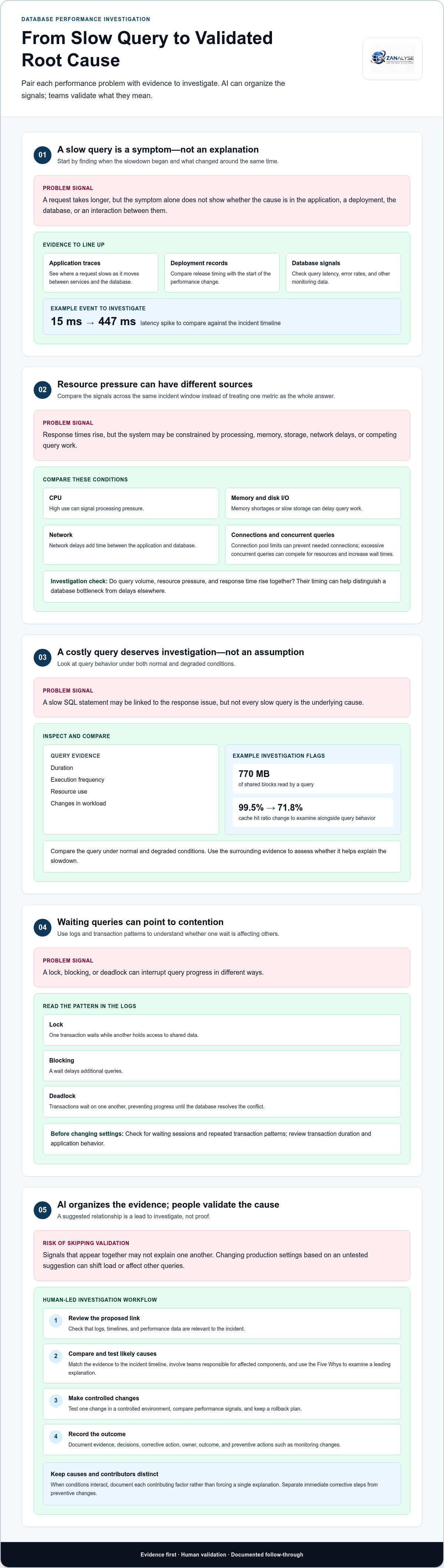
Application traces show where a request slows as it moves between services and the database. Compare trace timing with deployment records and database monitoring signals, such as query latency and error rates. If delays begin after a release, inspect affected requests and changed components to pinpoint a possible link. A latency spike from 15 ms to 447 ms, for example, gives investigators a measurable event to examine against the timeline.
Reviewing Resource and Query Load
CPU, memory, disk I/O, and network metrics reveal different constraints. High CPU can signal processing pressure, while memory shortages or slow storage can delay query work. Network delays add time between the application and database. Compare these signals across the same incident window. Connection pool limits can prevent applications from opening needed database connections, while excessive concurrent queries can compete for CPU, memory, and disk resources and increase wait times.
Check whether query volume, resource pressure, and response time rise together. This correlation can help distinguish a database bottleneck from delays elsewhere in a complex system.
AI can organize patterns and suggest causes, but teams should validate findings before changing production settings. Tuning can shift the load or affect other queries, so test one change in a controlled environment, compare performance signals, and keep a rollback plan. Document the evidence, decision, corrective action, owner, and outcome. Record preventive actions too, such as adjusting monitoring to detect the abnormal pattern, so future teams can assess whether the issue recurs.
Identifying root causes and contributing factors
Separate the underlying cause from conditions that worsened the slowdown. Define the symptom, compare the evidence, test likely causes, then document the action and any behavior change needed.
Validating Causal Factors
List possible causes, such as a release, increased workload, or a change in user behavior. Compare each with the incident timeline and relevant system evidence. A factor is more credible when its timing and effects match the slowdown and testing shows that it explains the performance change. Record performance gaps and improvement opportunities separately, so the final solution addresses causes rather than assumptions.
Identifying Inefficient SQL Queries
Review query duration, execution frequency, resource use, and changes in workload to find SQL statements linked to slow responses. For example, a query reading 770 MB of shared blocks may warrant investigation alongside a cache hit ratio drop from 99.5% to 71.8%. Compare the query’s behavior under normal and degraded conditions. This helps identify inefficient work without assuming every slow query is the underlying cause.
Diagnosing Queries with Logs and Metrics
To diagnose a slow query, match database logs with latency, error, and resource metrics from the same incident period. Group repeated entries by query or operation, then compare affected requests with normal activity. This sequence can pinpoint when performance changed and whether the pattern aligns with a deployment, workload shift, or system constraint. Validate the data before deciding which causal factor best explains the evidence.
Assessing Locks, Blocks, and Deadlocks
A lock can make one transaction wait while another holds access to shared data. Blocking occurs when that wait delays additional queries. A deadlock occurs when transactions wait on one another, preventing progress until the database resolves the conflict. Check logs for waiting sessions and repeated transaction patterns. If evidence points to contention, review transaction duration and application behavior before changing database settings.
AI-driven database root cause analysis
AI can examine incident records at scale, making recurring patterns easier to detect. It can compare logs, timelines, and performance data, then surface relationships that may explain why symptoms appeared together. This helps teams look beyond the first visible fault, but a suggested link is a lead to investigate, not proof of cause. Used well, AI makes root cause analysis for database performance issues more systematic.
For example, a system may show rising query latency alongside a new application error and a change in workload. AI can bring those signals into one incident view and highlight their timing. Investigators can compare the pattern with earlier incidents, review the relevant deployment, and test whether the suspected connection explains the slowdown. This approach to root cause analysis for database performance issues is especially useful when evidence comes from several services.
Use AI findings to organize the investigation, not to skip validation. Review the evidence behind each proposed cause, check that the data is relevant, and involve the teams responsible for affected components. The Five Whys can help examine a leading explanation: ask why the issue occurred, then follow each answer toward an underlying cause. When conditions interact, document each contributing factor instead of forcing a single explanation.
Once findings are validated, turn them into an action plan. Separate immediate corrective steps from preventive changes, assign an owner, and record how the result will be assessed. This record helps teams explain their decision, monitor for recurrence, and address critical risks rather than symptoms alone. AI-driven analysis is most useful when it makes evidence easier to review and supports accountable follow-through.
Explore a structured root cause analysis approach to help teams turn incident evidence into documented action.
ZANALYSE: ZANALYSE Standard License
ZANALYSE Standard License gives IT teams a structured way to investigate recurring database performance problems. The browser-based platform uses logs, timelines, and incident data to guide users through established root cause analysis techniques and generate reports with evidence, confidence scores, and corrective actions.
It can suit problem and incident managers, internal IT teams, managed service providers, and risk, compliance, and IT leaders who want more staff to contribute to problem management. For broader requirements, ZANALYSE also offers a Full License, annual or multi-annual price plans, and RCA Capacity Top-ups.
Use the findings to create a consistent investigation record and carry validated actions into follow-up work. Contact ZANALYSE to discuss the Standard License or visit www.zanalyse.com.
Make Every Investigation Strengthen the Next
A performance incident should leave the organization better prepared for the next one. Assign clear ownership, agree how teams will assess corrective actions, and share lessons across service and product groups. This turns root cause analysis for database performance issues into an operational capability, rather than a task that ends when service returns.
The next step is to set a practical standard for how investigations are managed across your teams. Decide who can lead an RCA, how findings are recorded, and how follow-up stays visible after urgent work moves on. ZANALYSE can support a consistent approach to problem management. To discuss database analysis and your team's needs, contact ZANALYSE. Start with one recurring challenge and use it to establish a process your team can sustain.
Frequently Asked Questions
Can AI detect slow SQL queries?
Yes. AI can flag SQL queries whose duration or resource use differs from normal patterns, then help prioritize which statements to review. For example, repeated slow calls from one application feature may point to a query worth investigating. Treat detection as a starting point: confirm the query’s behavior, workload, and recent changes before deciding on a fix.
What are the most common root causes of database performance issues?
Common causes include inefficient queries, unsuitable indexes, resource constraints, transaction contention, and sudden workload changes. The same symptom can have different explanations: a slow report may result from large data scans, while delays during peak activity may reflect competing requests. Look for evidence linking the suspected cause to the affected workload instead of automatically applying a familiar fix.
How can query execution plans identify database performance bottlenecks?
An execution plan shows the steps the database expects to use for a query, including how it accesses and combines data. Review costly scans, joins, and sorts, along with differences between estimated and actual row counts. If a query reads far more rows than it returns, investigate the access path and filtering logic. Compare plans before and after a change.
How can missing or inefficient indexes affect query performance?
Without a suitable index, a database may need to examine many rows to find matching records. An index that does not match the query’s filters or sort order may offer little benefit. Review the query conditions and execution plan together before adding or changing an index. Indexes can add work to data updates, so assess both read and write patterns.
How do you distinguish database bottlenecks from application or infrastructure issues?
Compare the same request across application timing, database activity, and infrastructure measurements. If the application waits before sending a query, investigate its processing path. If database execution takes most of the time, inspect query and database evidence. If delays occur between components, review network and service dependencies. Matching timestamps helps locate where response time accumulates.
Disclaimer
Some content on this website may be generated or assisted by artificial intelligence. While we strive to ensure that all information is accurate, relevant and up to date, AI-assisted content may contain errors or omissions. Content should therefore be considered informational and not as professional advice.


