


Repeated incidents are a pattern to investigate, not just tickets to close. Problem management investigates the underlying causes of incidents and supports lasting fixes, while incident management focuses on restoring service quickly. In ITIL 4, problem management is a formal practice, and preventing recurring IT incidents means using evidence from past issues to address their causes.
When teams are under pressure, restoring service can take priority. But recurring incidents and near misses may reveal patterns that a single ticket cannot. This article explains how problem management and root cause analysis help teams investigate those patterns, use incident data to spot emerging issues, and turn temporary workarounds into lasting corrective action.
Key Takeaways
- Separate rapid service restoration from investigating why incidents happen, then use reactive and proactive problem management to address both known failures and emerging risks.
- Choose a root cause analysis method that helps your team test causes against evidence and turn findings into corrective actions.
- Look across incident and near-miss records for repeated signals that individual tickets can hide, then prioritize patterns by their impact on services.
- Use ZANALYSE Standard License to guide staff through structured root cause analysis and create reports from logs, timelines, and incident data.
What is problem management?
Problem management investigates the causes behind one or more incidents and supports lasting corrective action. In ITIL 4, it is a formal practice in the Service Management practice group. Preventing recurring IT incidents requires teams to connect investigation findings with changes to operational practice.
Reactive and Proactive Problem Management
Reactive problem management investigates incidents that have already happened; proactive problem management looks for risks before they interrupt service. Both approaches help organizations replace repeated fixes with evidence-led action. For example, recurring application slowdowns may prompt teams to review performance trends before users report an outage. Comparing incident records can also expose causes shared across separate events. That makes preventing recurring IT incidents part of everyday operations, not just a response to major failures.
Problem Management and Incident Management
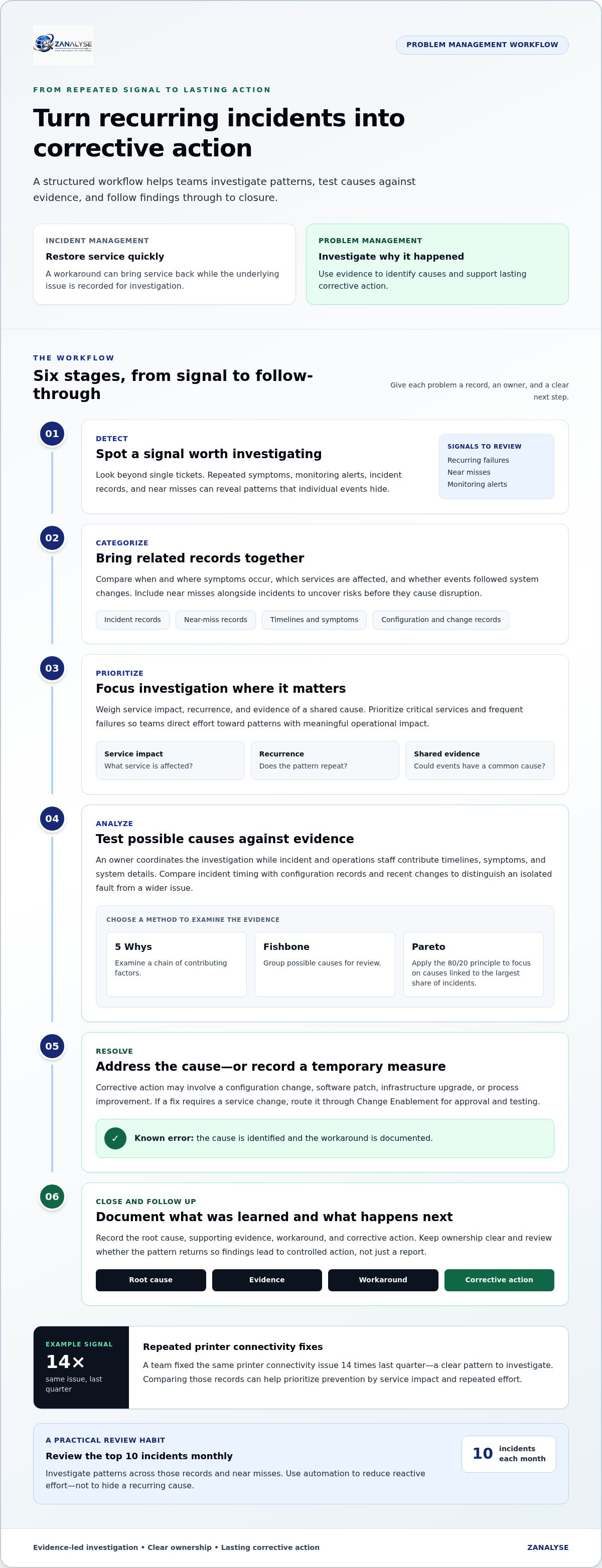
Incident management restores service after an unplanned interruption. Problem management investigates why it happened and how to prevent a repeat. A support team might restore access with a workaround, then record the underlying issue for investigation. Once the cause is identified and the workaround documented, the issue is a known error. Keeping these responsibilities distinct helps staff manage urgent recovery without losing sight of recurring issues.
Policies, Roles, and Responsibilities
A problem management policy defines how teams record, prioritize, investigate, and close problems. Assign an owner to coordinate evidence gathering, and have incident and operations staff contribute timelines, symptoms, and system details. Link findings to availability management so service-impact patterns inform reliability work. If a proposed fix requires a service change, route it through Change Enablement for approval and testing. Clear ownership connects investigation to controlled action instead of leaving findings in a report.
Root cause analysis methods
Root cause analysis uses structured methods to determine why incidents or near misses occur. A useful method helps teams test evidence and choose corrective actions, rather than merely describe symptoms.
The Problem Management Workflow
The problem management workflow takes an issue from detection through categorization, prioritization, analysis, resolution, and closure. Each stage gives the problem a record, an owner, and a clear next step. For example, a service desk can flag recurring application failures. The team categorizes them, assesses service impact, and prioritizes investigation. During analysis, it compares timelines and system changes to test possible causes. Resolution addresses the cause or applies a temporary measure; closure records findings and follow-up actions. Prioritize critical services and frequent failures, and use monitoring alerts and trend analysis to identify operational patterns.
Learning from Near Misses and Incidents
Near-miss analysis examines events that could have caused disruption alongside incidents that did. Including both helps teams see risks before they produce service impact. For example, compare a failed backup that was caught in time with a later recovery failure; shared timing or configuration details may point to a common cause. Use the 5 Whys to examine a chain of contributing factors, or a fishbone diagram to group causes. Pareto analysis applies the 80/20 principle to focus attention on causes linked to the largest share of incidents.
Monitoring and trend analysis help determine which finding deserves attention first: weigh service impact, recurrence, and evidence of a shared cause. A permanent fix might require a configuration change, software patch, infrastructure upgrade, or process improvement. Record the root cause, evidence, workaround, and corrective action so teams can review whether the pattern returns. A guided root cause analysis platform can help structure evidence and document findings for consistent follow-through.
Using incident and near-miss data to identify recurring patterns
A single ticket shows symptoms, while linked incident and near-miss records may reveal underlying patterns. Review related records together to focus root cause analysis on issues worth addressing.
ITSM Tools and Automation
ITSM tools bring incident records, service desk reports, and monitoring alerts into a shared view. This helps teams track repeated symptoms and compare when, where, and after which changes they occur. Review the top 10 incidents monthly, then investigate patterns across those records and near misses. Automated responses can restore basic service issues, giving staff more time for proactive problem management and permanent resolution. Use automation to reduce reactive effort, not to hide a recurring cause.
Configuration Errors and Change Failures
Configuration drift and unsuccessful changes can cause similar symptoms across services, making them valuable patterns to investigate. Compare incident timelines with configuration records and recent changes. Check whether failures began after a change or affect systems with the same setup. Review disruptive changes through Change Enablement, including their approvals and testing. This evidence helps distinguish an isolated fault from an underlying issue affecting multiple systems.
Near misses belong in the same review as outages because they can expose a weakness before it causes service impact. Track symptoms, affected services, timing, and corrective actions, then compare them during root cause analysis. A team that fixed the same printer connectivity issue 14 times last quarter had a clear pattern to investigate. Recurring failures also consume staff effort and interrupt operational work. Use those records to prioritize prevention by service impact and repeated effort.
ZANALYSE: ZANALYSE Standard License
ZANALYSE Standard License helps IT teams investigate recurring issues using logs, timelines, and incident data. The platform guides users through established root cause analysis techniques and generates structured reports with evidence, confidence scores, and corrective actions. Its browser-based workflow helps process managers, support staff, and operations teams share investigation work instead of relying on a small group of specialists.
Use it when investigations are hard to repeat consistently or useful evidence is spread across records and timelines. ZANALYSE also offers a Full License, annual or multi-annual plans, and RCA Capacity Top-ups.
Contact ZANALYSE to discuss a licence option for your root cause analysis needs.
Make prevention part of everyday operations
Preventing recurring IT incidents requires making investigation part of routine operations. Choose a recurring pattern, assign someone to coordinate the investigation, and share the findings with the people who handle related issues. This helps useful knowledge inform future decisions instead of remaining buried in a closed ticket.
Schedule regular reviews to assess whether corrective actions addressed the cause and whether the pattern continues. If it does, revisit the evidence and refine the analysis. This creates a practical feedback loop for support teams, process managers, and service providers, without making prevention the responsibility of one specialist.
For support with structured root cause analysis, contact ZANALYSE about IT incidents. A clear process helps your teams turn repeated disruptions into opportunities for lasting improvement.
Frequently Asked Questions
What is incident management?
Incident management coordinates the response to an unplanned service interruption and aims to restore normal service. If staff cannot access a shared application, for example, the service desk records the impact, routes the issue to the right support team, and keeps affected users informed. Clear incident records also give investigators useful details if similar disruptions recur.
What is a Known Error Database (KEDB) and why does it matter?
A Known Error Database (KEDB) records problems with identified causes and documented workarounds. It helps support staff find an established response instead of repeating initial troubleshooting. For example, an agent handling a familiar login fault can use the recorded workaround while the underlying problem remains tracked for a lasting fix. Keep entries clear, current, and linked to relevant incident records.
What is IT incident management and how does it differ from problem management?
Incident management organizes service restoration, while problem management investigates incident causes and supports prevention. If a service becomes unavailable after a deployment, incident staff focus on restoring access while problem staff examine the deployment and related evidence. Teams in Canada, Australia, and Europe can make the handoff clearer by recording the affected service, actions taken, and unresolved questions.
How do you identify the root cause of recurring IT incidents?
To identify a likely root cause, compare incident records for shared conditions and test the explanation against evidence. Look for common services, error messages, timing, affected user groups, and recent operational changes. For example, failures reported by different teams after the same scheduled task may point to a shared dependency. Treat the cause as a hypothesis until evidence supports it.
Disclaimer
Some content on this website may be generated or assisted by artificial intelligence. While we strive to ensure that all information is accurate, relevant and up to date, AI-assisted content may contain errors or omissions. Content should therefore be considered informational and not as professional advice.


