


During a service disruption, teams may need to compare timestamps, logs, and incident notes before they agree on what happened. Incident timeline visualization software can bring that sequence into view, but a clear chronology alone cannot explain which event mattered or why the failure occurred.
That distinction matters. Process managers, IT support staff, IT leaders, product managers, and service providers need investigations that move beyond a visual replay to evidence-backed causes and consistent follow-up. Look for software that connects events to supporting evidence, guides users through a structured root cause analysis (RCA) approach, and records corrective actions in a way that makes problem management accessible to more staff.
This guide explains which capabilities to assess and how to use an incident timeline as one input to a broader investigation. You’ll learn how to evaluate event context and evidence, distinguish sequence from cause, and turn findings into reports and actions that colleagues can understand and use.
Key Takeaways
- Assess incident timeline visualization software by how clearly it presents event context and links chronology to evidence.
- Treat a timeline as an organized sequence of events, not proof of what caused the incident.
- Separate observed facts from interpretations, then use an established RCA method to guide the investigation and define corrective actions.
- ZANALYSE uses logs, timelines, and incident data to generate structured RCA reports with evidence, confidence scores, and corrective actions.
What Incident Timeline Visualization Software Should Help IT Teams See
Incident timeline visualization software arranges incident events in chronological order so teams can review what happened during an investigation. Its value is more than a cleaner display: it helps people compare records from different sources and ask better questions about the sequence. For a broader overview of the response process, see Incident Response.
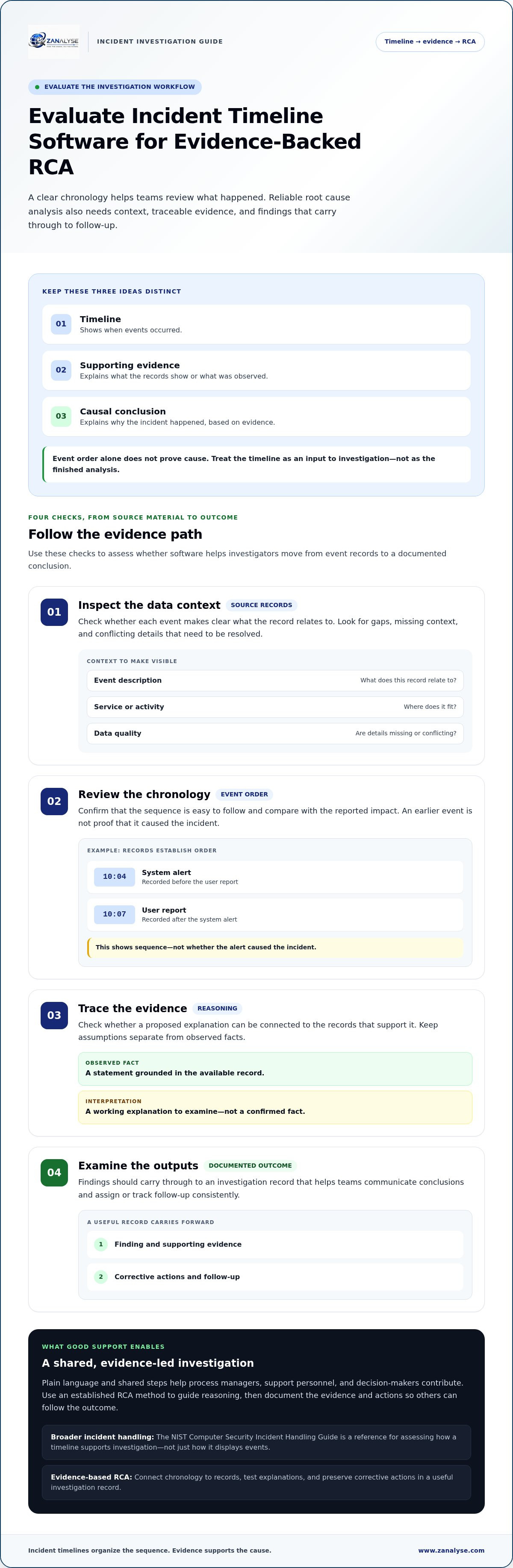
An incident timeline shows when events occurred; supporting evidence explains what was observed; a causal conclusion explains why the incident happened. Keep those distinctions clear. A timeline might show an alert before a service interruption, but that order alone does not prove the alert, or any nearby change, caused the interruption.
Which incident details make a timeline useful?
Start with timestamps, concise event descriptions, and relevant log information. Together, these details help investigators establish sequence and understand what each record represents. For example, a user report at 10:07 and a system alert at 10:04 establish the order of those two events. A log entry from around the same time may add evidence about what the system recorded, but the team still needs to interpret it.
Add context by noting which service or activity each event relates to. Mark confirmed observations separately from working theories. Missing descriptions, incomplete logs, or inconsistently recorded timestamps can make events difficult to compare. A gap in the timeline does not prove that nothing happened; the available records may simply not show it.
Evidence-based investigation also means judging how strongly records support a conclusion. Understanding IT incident confidence scoring can help teams communicate when one explanation is better supported than another. Use the timeline to focus the investigation, then examine the evidence before deciding what caused the incident.
How to Evaluate Incident Timeline Visualization Software for RCA
Assess incident timeline visualization software by following an investigation from its source material to its documented outcome. A clear display helps, but the workflow should also make event context visible and show how investigators reached their conclusions.
Chronology can show what came before what, but defensible root cause analysis requires evidence that supports a causal explanation.
- Inspect the data context. Check whether each event description makes clear what the record relates to. Look for gaps, missing context, and conflicting details that investigators need to resolve.
- Review the chronology. Confirm that the sequence is easy to follow and compare with the incident’s reported impact. Do not treat an earlier event as proof of cause.
- Trace the evidence. Check whether investigators can connect a proposed explanation to the records that support it. Assumptions should be marked as interpretations, not presented as observed facts.
- Examine the outputs. Findings should carry through to a useful investigation record, so teams can communicate conclusions and assign or track follow-up consistently.
The NIST Computer Security Incident Handling Guide provides a broader incident-handling reference. It is a useful reminder to assess how a timeline supports investigation, not just how it displays events.
Can the timeline support consistent investigation across teams?
Process managers, support personnel, and decision-makers may each bring different knowledge to an investigation. Shared steps and plain language make it easier for them to contribute, while clear labels for observations and interpretations help prevent assumptions from being mistaken for facts. This supports wider participation without requiring every contributor to have the same responsibilities. Teams can use established root cause analysis methods to guide their reasoning.
For teams connecting timeline evidence with a guided RCA workflow, learn about ZANALYSE.
Turn Incident Timelines into Structured Root Cause Analysis
A timeline becomes useful to problem management when teams move from reviewing event order to testing explanations and recording what should change. Treat the sequence as an input to the investigation, not the finished analysis. A practical workflow is to:
- Review the sequence. Check the order of events and note gaps or details that need clarification.
- Examine the evidence. Compare relevant logs and incident information with each proposed explanation.
- Apply an RCA method. Use a structured approach to explore possible causes instead of settling on the first plausible event.
- Document corrective actions. Record the finding, its supporting evidence, and the steps intended to address the cause.
This process turns event chronology into a record others can follow. Further discussion of Visualizing and Timelining in Digital Forensic Analysis also shows how timelines can support an investigation of cause and effect, while conclusions still depend on evidence.
Where ZANALYSE fits in an evidence-based workflow
ZANALYSE uses logs, timelines, and incident data to generate structured root cause analysis reports with evidence, confidence scores, and corrective actions. It guides users through established RCA techniques with intuitive navigation, helping make problem management more accessible across IT staff. These structured reports give IT teams and service providers a consistent way to communicate findings and follow-up, rather than leaving investigation knowledge with only a few specialists.
For teams assessing a guided approach to structured RCA, view the ZANALYSE Standard License.
Make Each Investigation a Starting Point for Better Problem Management
Make investigation part of how your team learns, not an exercise that ends when service is restored. Decide how findings will be reviewed, who will own follow-up, and how lessons can inform future decisions. A shared approach helps process managers, IT staff, and service providers build problem management into everyday work.
Use that goal to guide your choice of incident timeline visualization software. Look for a workflow that lets staff contribute clearly, so an investigation does not depend on a small group holding all the context. For teams working across Canada, Australia, and Europe, consistent event descriptions and clear timestamp context can also make it easier to compare records and share findings across locations.
ZANALYSE helps teams turn logs, timelines, and incident data into structured RCA reports with evidence, confidence scores, and corrective actions. Explore the ZANALYSE Standard License to support more accessible root cause analysis across your team.
Frequently Asked Questions
What is incident timeline visualization software?
Incident timeline visualization software arranges incident-related records by time so investigators can review activity in sequence. For example, a team might compare a customer report, a service alert, and a change record in one investigation view instead of relying on memory or scattered notes. A shared chronology helps people discuss the same events, while leaving their meaning open to investigation.
How does an incident timeline help with root cause analysis?
An incident timeline helps investigators examine how recorded activity relates to the reported impact. If service problems begin after a system change, the team can review relevant records and consider whether the change is a plausible explanation or simply occurred nearby in time. This focuses the discussion and helps investigators identify what further evidence they need.
What should I look for in incident timeline visualization software?
Look for a workflow that people can understand, including staff who do not work on technical investigations every day. Check whether it helps teams record uncertainty, explain findings in plain language, and hand off follow-up clearly. For organizations serving teams or clients across Canada, Australia, and Europe, consistent wording and clear event records can also support collaboration across locations.
Can incident timeline visualization software prove what caused an outage?
No. A timeline can help organize and review records, but it cannot establish causation just because one event came before another. Investigators need to assess whether the evidence supports a proposed cause and consider other explanations. If records are incomplete or disagree, document that uncertainty instead of presenting an unverified explanation as a confirmed root cause.
Disclaimer
Some content on this website may be generated or assisted by artificial intelligence. While we strive to ensure that all information is accurate, relevant and up to date, AI-assisted content may contain errors or omissions. Content should therefore be considered informational and not as professional advice.


