


What if an incident timeline did more than record what happened and helped your team establish why? When alerts, chat updates, system records, and staff notes sit in different places, building that account manually takes time and can leave evidence behind. An incident timeline creation tool should make it easier to organize the record and support investigation, not just display events.
This guide explains how to evaluate an incident timeline creation tool for clear event sequencing, traceable evidence, and practical investigation workflows. You’ll learn what to look for as your team moves from scattered records to a consistent incident account, then connects findings to corrective actions. We’ll also cover ease of use and repeatability, so problem management can involve more IT roles instead of depending on a few experienced specialists.
Key Takeaways
- Choose an incident timeline creation tool that brings relevant information together and makes event order easy to follow.
- Check whether reviewers can trace evidence to its source and see where information is uncertain.
- Look for guided analysis that supports established RCA techniques without treating an automated report as a substitute for human judgment.
- Connect findings to corrective actions so teams can follow through and apply lessons across the organization.
What an incident timeline creation tool should do beyond list events
An incident timeline creation tool organizes events and related records into a sequence that people can review and investigate. It can help show when an alert fired, when a change occurred, and when users first reported an issue. Chronology is only the starting point, though. A useful workflow connects each event to its supporting evidence, analysis, and follow-up actions.
“An incident timeline shows the sequence of events; it does not, by itself, prove which event caused the incident.” Root cause analysis requires investigators to assess evidence, consider contributing factors, and evaluate possible explanations. A timeline provides structure for that work, not a shortcut around judgment. For a foundational overview, see root cause analysis.
Which incident timeline problems should the tool solve?
Incident details often sit across logs, tickets, chat records, and individual notes. Reconstructing the sequence from these fragments can take staff time and leave responders with conflicting accounts. A consistent timeline gives the team a shared reference point. It also helps reviewers distinguish what is documented from what is inferred. For more on assessing evidence quality, see IT incident confidence scoring.
For example, a service slowdown may coincide with a system change and a rise in user reports. Record when each event occurred, where the information came from, and whether the timestamp reflects the event itself or when it was reported. Then assess what the evidence supports instead of treating events that happened close together as proof of cause. For teams working across Canada, Australia, and Europe, a consistent approach to recording and reviewing timestamps can help keep a shared incident account clear across locations. A repeatable structure also makes investigation less dependent on a few experienced specialists.
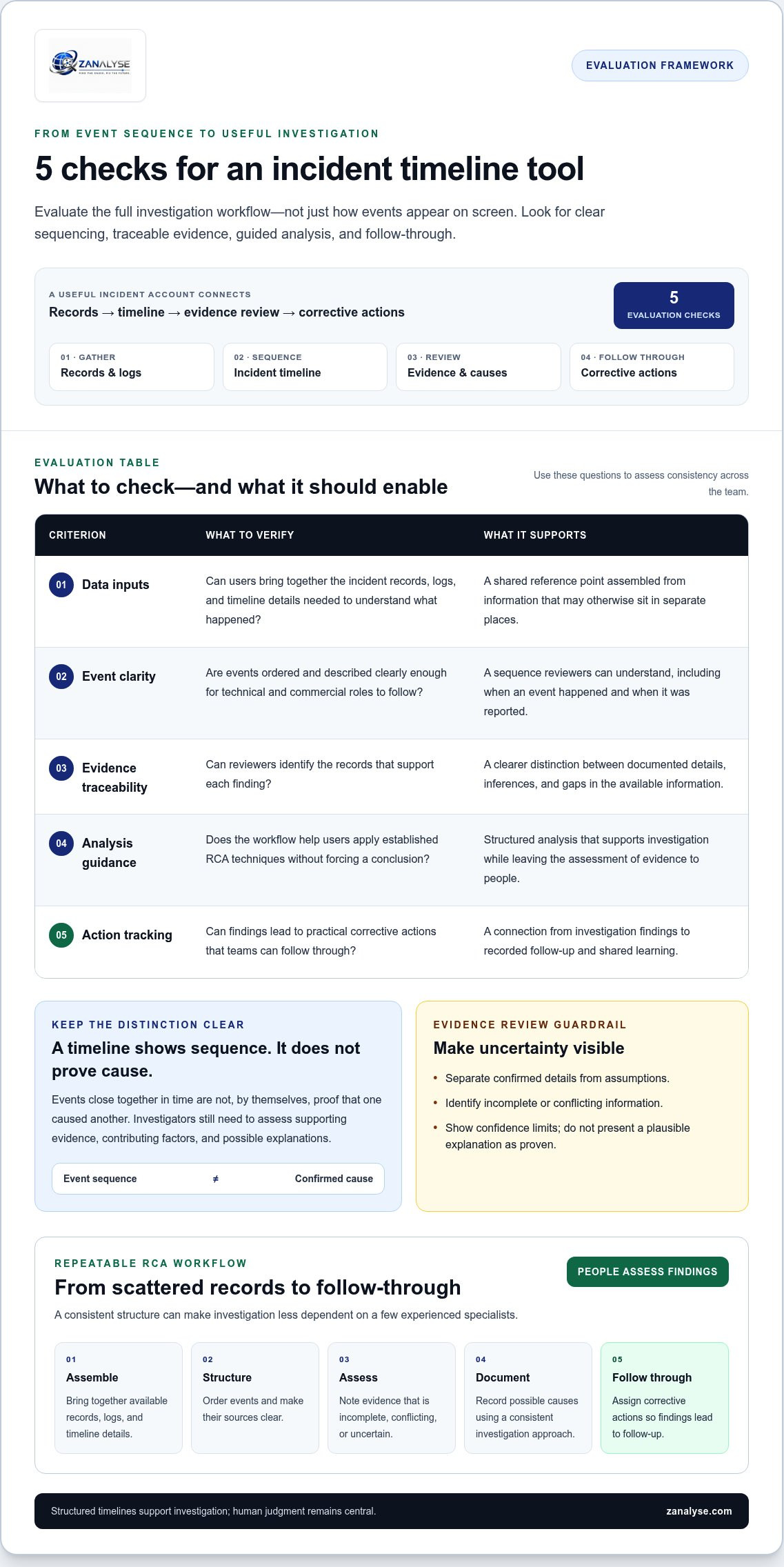
How to evaluate incident timeline creation tools: five practical criteria
Assess the tool as part of an investigation workflow, not just as a display for events. Use these five criteria to judge whether it can support consistent analysis across your team:
- Data inputs: Can users bring together the incident records, logs, and timeline details needed to understand what happened?
- Event clarity: Are events ordered and described clearly enough for technical and commercial roles to follow?
- Evidence traceability: Can reviewers identify the records that support each finding?
- Analysis guidance: Does the workflow help users apply established RCA techniques without forcing a conclusion?
- Action tracking: Can findings lead to practical corrective actions that teams can follow through?
Pay particular attention to how the tool handles incomplete or conflicting evidence. Check whether a report separates confirmed details from assumptions, identifies gaps, and makes limited confidence visible. It should not present a plausible explanation as proven. Traceable evidence and transparent confidence make investigation reports easier to review, challenge, and act on. The NIST Computer Security Incident Handling Guide offers context for treating investigation and post-incident work as parts of a broader response process.
Can the timeline support a repeatable root cause workflow?
Follow the process from event sequence to analysis. Can users apply a suitable method, connect findings to evidence, and record corrective actions? Explore root cause analysis methods to understand how method choice can shape an investigation. An incident timeline creation tool should structure the work while leaving room for human judgment. ZANALYSE guides users through established RCA techniques and creates structured reports with evidence, confidence scores, and corrective actions. Explore ZANALYSE’s approach to structured RCA.
Turn incident timeline requirements into a scalable RCA workflow
Build a process people can repeat, from the first review of incident records through to follow-up. An incident timeline creation tool should help users move through clear steps:
- Assemble incident data from available records, logs, and timeline details.
- Structure the timeline so events can be reviewed in sequence, with their sources clear.
- Assess the evidence and note where information is incomplete, conflicting, or uncertain.
- Document possible causes using a consistent investigation approach.
- Assign corrective actions so findings lead to follow-through.
Automation can reduce the effort of organizing an investigation, but it should not replace human judgment. Treat a structured report as support for reviewers: people still need to assess whether the evidence justifies a finding and whether proposed actions address it. ZANALYSE brings logs, timelines, and incident data into guided root cause analysis, with reports that include evidence, confidence scores, and corrective actions.
What should buyers expect from an organization-wide approach?
Problem management becomes less dependent on a few specialists when staff across IT roles can follow an intuitive process and take part in analysis. ZANALYSE uses a pool of included RCAs to support broader participation. Its structured reports can support ISO- and DORA-related compliance work, but using a tool does not itself establish compliance. For an overview of the offering, read the ZANALYSE Standard License buying guide. Explore ZANALYSE to see how guided RCA can support a shared approach across your organization.
Build a more repeatable path from incident to action
A strong incident timeline creation tool should do more than arrange events in order. It should help teams connect records to evidence, assess what that evidence supports, and turn findings into corrective actions. When comparing tools, look for clear analysis guidance and reports that show confidence and uncertainty without replacing investigator judgment.
ZANALYSE brings these steps into a structured root cause analysis workflow. It guides users through established RCA techniques and creates reports that include evidence, confidence scores, and corrective actions. Intuitive navigation and a pool of included RCAs are designed to support broader participation, helping distribute problem management beyond a small group of specialists.
Make incident investigations easier to follow and repeat across your organization. Explore ZANALYSE’s structured root cause analysis workflow and see how a shared approach can help your teams turn incident learning into practical improvements.
Frequently Asked Questions
What does an incident timeline creation tool do?
An incident timeline creation tool organizes incident events and related data into a sequence teams can review. It helps bring together records such as logs, incident details, and responder notes, making it easier to understand what happened and when. For root cause analysis, the timeline should also help connect events to supporting evidence, findings, and corrective actions.
How do you create an incident timeline?
Start by gathering relevant incident records, such as logs, tickets, communications, and notes. Put events in order, record each source, and separate confirmed details from assumptions. Where timestamps come from different records, make the time reference clear. Then review the sequence with people involved in the incident, assess what the evidence supports, document possible causes, and assign corrective actions. A consistent process makes timelines easier to review and reuse.
Can an incident timeline tool identify the root cause automatically?
A timeline can support root cause analysis, but the event sequence alone does not prove what caused an incident. A tool may organize information and guide users through established RCA techniques, while investigators assess the evidence and evaluate possible explanations. ZANALYSE creates structured reports with evidence, confidence scores, and corrective actions to support that investigation, not replace human judgment.
What should you look for when choosing an incident timeline tool?
Look for useful data inputs, clear event sequencing, traceable evidence, practical analysis guidance, and action tracking. Check whether reports make uncertainty visible rather than presenting an unverified explanation as fact. Also consider whether the workflow is straightforward for staff in different roles. That matters for organizations and service teams coordinating problem management across Canada, Australia, and Europe.
Disclaimer
Some content on this website may be generated or assisted by artificial intelligence. While we strive to ensure that all information is accurate, relevant and up to date, AI-assisted content may contain errors or omissions. Content should therefore be considered informational and not as professional advice.


