

What if an investigation could be completed consistently without relying on the few people who know every workaround? Incident investigation software should help teams turn scattered logs, timelines, and incident notes into a clear account of what happened, why it happened, and what needs to change. Choosing a tool takes care: some focus on response coordination, while others structure root cause analysis and follow-up.
If reports vary by investigator and corrective actions are hard to trace, a place to store incident data is not enough. This guide explains how to assess software that can make investigations repeatable and help more staff contribute. Use the criteria to compare investigation workflows, evidence-based reports, action tracking, and ease of use against your team’s needs.
Key Takeaways
- Choose incident investigation software that connects evidence, findings, and corrective actions in a clear, traceable workflow.
- Compare tools by workflow guidance, report structure, evidence traceability, action tracking, and ease of use.
- Check whether staff outside the specialist group can follow established investigation methods, without treating automated conclusions as proof.
- Scale root cause analysis with a repeatable process, broader staff participation, and follow-up on corrective actions.
What incident investigation software does, and where it fits in IT operations
Incident investigation software organizes incident information, evidence, analysis, findings, and follow-up actions in a structured workflow. It helps teams document how they reached a conclusion and what should happen next, so investigations do not depend on one person’s notes or memory.
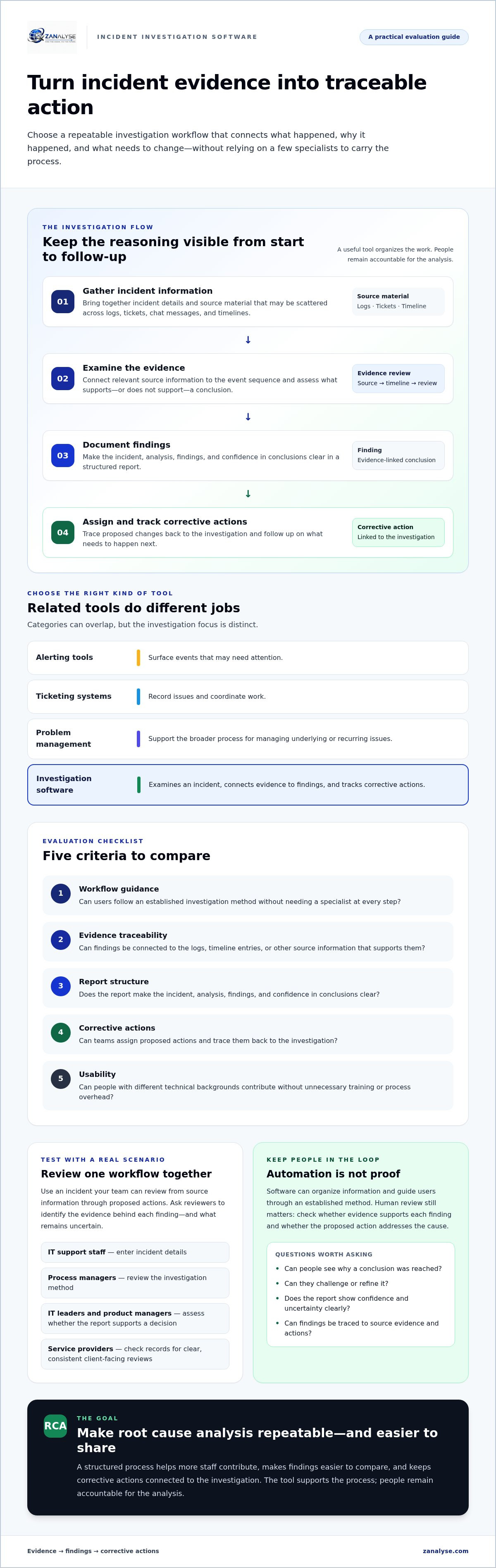
It serves a different purpose from related IT tools, although the categories can overlap. Alerting tools surface events that may need attention. Ticketing systems record issues and coordinate work. Problem management platforms support a broader process for managing underlying or recurring issues. Investigation software focuses on examining an incident, connecting evidence to findings, and tracking corrective actions.
This distinction matters when records are scattered across logs, tickets, chat messages, and timelines. Investigators may spend time reconstructing the sequence of events before they can assess what caused the disruption. Teams may also document similar incidents in different ways, making findings harder to compare and actions harder to follow across the organization.
How incident investigations connect evidence to corrective action
A useful investigation follows a clear sequence: gather incident information, examine relevant evidence, document findings, then assign and track corrective actions. This keeps the reasoning visible, from the original event to the proposed change. It reflects the purpose of Root cause analysis: looking beyond the immediate symptom to examine contributing causes.
Software can organize information and guide users through an established method, but it should not replace human review. Check whether the evidence supports each finding and whether the proposed action addresses the cause. This lets non-specialists contribute while keeping conclusions grounded in evidence. The tool supports the process; people remain accountable for the analysis.
How to evaluate incident investigation software without adding process overhead
Assess incident investigation software against the work your teams need to do, not the length of its feature list. A useful process guides people without adding steps that do not improve investigation quality or traceability. Compare options using the criteria below, then test them with an incident your team can review from source information through proposed actions.
| Criterion | What to check |
|---|---|
| Workflow guidance | Can users follow an established investigation method without needing a specialist at every step? |
| Evidence traceability | Can investigators connect findings to the logs, timeline entries, or other source information that supports them? |
| Report structure | Does the report make the incident, analysis, findings, and confidence in conclusions clear? |
| Corrective actions | Can teams assign proposed actions and trace them back to the investigation? |
| Usability | Can people with different technical backgrounds contribute without unnecessary training or process overhead? |
Use a realistic scenario to test the whole workflow. Have IT support staff enter incident details, process managers review the investigation method, and IT leaders or product managers assess whether the report supports a decision. Ask reviewers to identify which evidence supports each finding and what remains uncertain. Service providers should also check whether the workflow produces clear, consistent records for client-facing reviews.
Questions to ask about evidence, reports, and team adoption
Ask vendors to show how a report connects source evidence to findings, confidence, and proposed corrective actions. Confidence scores can make uncertainty visible, but they do not replace human review. For more context, see this guide to IT incident confidence scoring.
Check whether staff can understand why a conclusion was reached and whether they can challenge or refine it. The NIST Computer Security Incident Handling Guide can help teams consider how investigation fits within a broader incident-handling process. For a practical reference point, compare ZANALYSE’s RCA approach against the same criteria.
For teams working across Canada, Australia, and Europe, include contributors from different locations and roles in the evaluation. Check that they can follow the same investigation process and understand the resulting reports. If your organization needs to address ISO standards or DORA, assess how the tool’s reports and workflows fit your own compliance processes.
How investigation software can scale root cause analysis across IT teams
Root cause analysis is easier to share when it follows a repeatable process rather than an individual specialist’s preferred approach. Choose a suitable workflow, show contributors how to use it, and ask them to review evidence before accepting findings. Assign corrective actions with clear ownership so teams can check whether changes were completed.
This structure can help IT support staff take part in investigations while process managers maintain consistency. IT leaders and product managers can use the resulting reports to review findings and proposed actions. Service providers can use a shared approach to make investigation records clearer for clients. The NIST Computer Security Incident Handling Guide offers a reference for how investigation and post-incident activity fit within broader incident handling.
What a distributed, evidence-led investigation process looks like
Logs, incident timelines, and other incident data provide the basis for a structured report. Guided root cause analysis can help contributors examine that information using an established method, then document findings alongside supporting evidence. Explore automated root cause analysis methods and this problem management reference guide for related approaches.
Confidence scores can make the strength or uncertainty of a finding visible to reviewers. They are not proof on their own: teams still need to check the evidence and decide whether proposed corrective actions address the cause. This is how incident investigation software can support broader participation without handing judgment over to automation.
ZANALYSE is an automated root cause analysis platform that guides users through established RCA techniques and generates structured reports from logs, timelines, and incident data. Reports feature evidence, confidence scores, and corrective actions. Its general availability is scheduled for October 2026. Review ZANALYSE’s RCA platform against the evaluation criteria above.
Build a more consistent investigation practice
The right incident investigation software should make the path from evidence to action easier to follow, without adding unnecessary process. Prioritize clear workflows, traceable findings, and corrective actions that teams can review. These foundations help more staff contribute to root cause analysis instead of leaving investigations to a small group of specialists.
ZANALYSE is designed to support this approach with structured reports featuring evidence, confidence scores, and corrective actions. Its platform guides users through established RCA techniques and is designed to decentralize problem management across IT staff, while keeping people responsible for reviewing conclusions.
Assess the workflow against your team’s needs, then explore ZANALYSE and its structured approach to root cause analysis. A consistent, evidence-based process can help your organization turn investigations into clearer decisions and meaningful follow-up.
Frequently Asked Questions
What is incident investigation software?
Incident investigation software helps teams examine IT incidents by organizing incident information, evidence, findings, and follow-up actions in a structured workflow. It can guide users through established root cause analysis methods and support reports that connect conclusions to evidence. The goal is to make investigations easier to review and repeat, while people remain responsible for assessing evidence and validating findings.
How is incident investigation software different from incident management software?
Incident investigation software focuses on understanding what caused an incident and documenting findings and corrective actions. Incident management software generally supports the response, such as recording an issue, coordinating work, and restoring service. The tools may overlap, but their main purposes differ: one helps teams investigate causes, while the other helps manage the incident and its immediate operational impact.
Can incident investigation software help teams identify root causes?
Yes. It can guide investigators through established methods, organize incident data, and structure the reasoning that leads to a proposed cause. This can make root cause analysis more consistent and let more IT staff contribute. Software does not make a conclusion proof: investigators still need to review the evidence, consider alternative explanations, and use their judgment before agreeing on findings or actions.
What should I look for when choosing incident investigation software?
Check whether the software links findings to source evidence, guides users through a repeatable workflow, and produces clear reports with traceable corrective actions. Test how easy it is for both specialists and non-specialists to use. For teams working across Canada, Australia, and Europe, consider whether the process supports consistent contributions across locations and roles without adding unnecessary steps.
Ready to assess a structured RCA workflow for your team? Explore ZANALYSE and compare its approach with your investigation requirements.
Disclaimer
Some content on this website may be generated or assisted by artificial intelligence. While we strive to ensure that all information is accurate, relevant and up to date, AI-assisted content may contain errors or omissions. Content should therefore be considered informational and not as professional advice.


