


What makes an RCA report useful after an incident is over? It is not just a polished timeline. Teams need to bring scattered notes, logs, and incident records together, then distinguish observed facts from conclusions. This guide explains how to write rca report content that readers can trace back to evidence, with confidence stated clearly rather than overstated.
A strong report also turns findings into corrective actions with named owners and a way to verify completion. That can be difficult when support teams, process managers, IT leaders, product managers, and service providers contribute different perspectives. You’ll find a reusable report structure, ways to connect evidence to conclusions, and practical criteria for defining actions people can assign and check. The result is a record that helps teams understand what happened and reduce the chance of recurrence.
Key Takeaways
- See what an RCA report needs to explain so readers can understand the incident without joining the investigation.
- Follow a practical sequence for how to write rca report content, from defining the impact to documenting findings and follow-up.
- Use a consistent report outline to keep incident details, supporting evidence, and conclusions easy to follow.
- Turn findings into corrective actions with clear owners and verification criteria, helping teams track whether changes are completed.
What an Effective RCA Report Must Make Clear
An RCA report is a structured account of an incident: what happened, what evidence was reviewed, how the team reasoned from that evidence, what it concluded, and what follow-up is planned. It should make sense to people who weren’t part of the investigation, including support staff, process managers, IT leaders, and product teams. Give readers enough context to understand the impact and the basis for the findings, not just a list of technical events.
Keep every claim traceable. As Root Cause Analysis on Wikipedia outlines, RCA uses a structured approach to examine causes. The report should show how the team applied that reasoning to this incident. A concise principle to follow is: “State what the evidence shows, label what the team infers, and separate both from the actions it recommends.”
Separate Symptoms, Contributing Factors, and Root Cause
Consider an incident where users can’t sign in because a service’s security certificate has expired. The symptom is the visible problem: sign-in attempts fail. A contributing factor might be that the renewal reminder went to an unmonitored mailbox. The root cause could be that the renewal process had no assigned owner. Treat that last claim as a conclusion only if the investigation supports it.
Certificate records and sign-in logs may show when the certificate expired and when sign-in failures began. Those are observed facts. The conclusion that unclear ownership allowed the expiration is an interpretation supported by the records and process review, not something directly shown by a log. State the evidence, explain the reasoning, and note any remaining uncertainty. Keep recommendations, such as assigning an owner, in the follow-up section rather than presenting them as evidence.
Choosing a suitable analysis approach can help teams test their reasoning. Explore root cause analysis methods to compare options for different incidents.
How to Write an RCA Report: A Practical Sequence
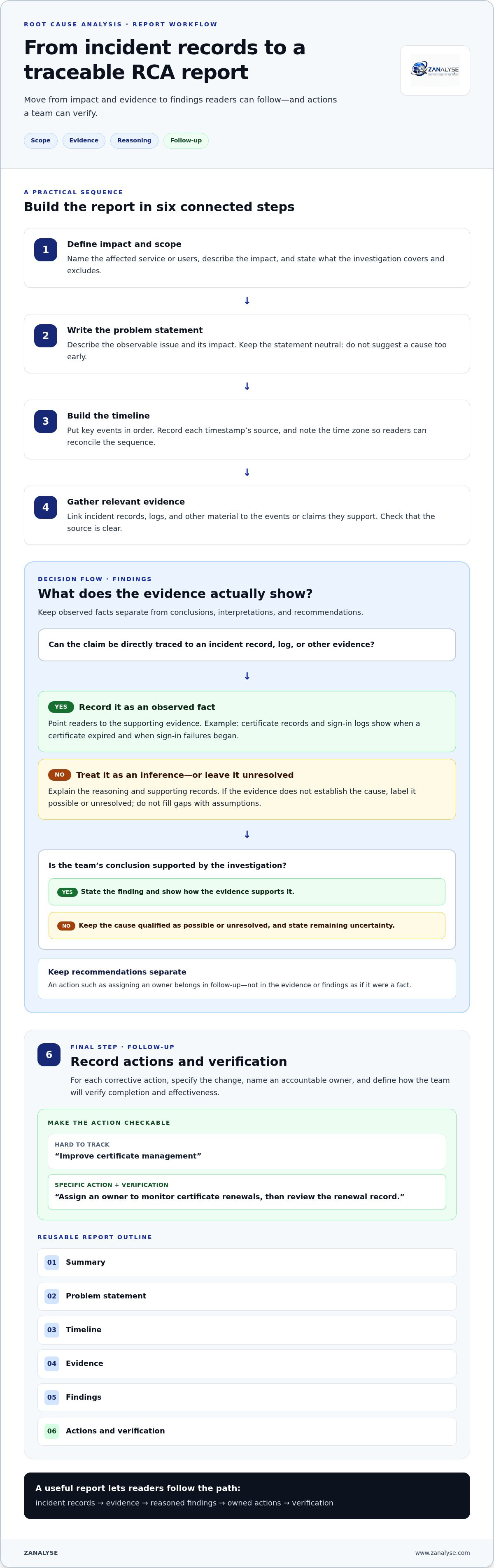
A clear process turns scattered incident records into a report others can follow. Use this sequence to connect scope, evidence, conclusions, and follow-up. It’s a practical way to approach how to write rca report content without claiming more than the investigation established.
- Define impact and scope. Name the affected service or users, describe the impact, and say what the investigation covers and excludes.
- Write the problem statement. Describe the observable issue and its impact without suggesting a cause too early.
- Build the timeline. Put key events in order, recording timestamps and where each timestamp came from.
- Gather relevant evidence. Link incident records, logs, and other material to the events or claims they support.
- Document findings. Explain the reasoning, distinguish established facts from interpretation, and state what remains uncertain.
- Record actions and verification. Specify the follow-up, name an owner, and define what will show whether the action is complete and effective.
A concise report outline is: summary, problem statement, timeline, evidence, findings, actions, and verification. For each conclusion, point readers to the incident evidence that supports it.
Build Each Report Section from Incident Records
Use timestamps from relevant logs and incident records to reconstruct the sequence. For example, a service disruption report might compare the first user report with monitoring alerts and a recorded configuration change. Check whether the timestamps use the same time zone. If they don’t, record the source and time zone for each entry so readers can reconcile the sequence. Don’t fill gaps with assumptions. Mark a cause as possible or unresolved when the records don’t establish it. For a closer look at confidence and supporting evidence, see IT incident confidence scoring.
Teams that want a repeatable way to turn logs, timelines, and incident data into structured reports can use ZANALYSE’s root cause analysis platform. Its reports include evidence, confidence scores, and corrective actions.
Make RCA Reports Actionable, Consistent, and Reusable
A finding only creates value when someone can act on it. Make each corrective action specific: state the change, assign an accountable owner, and define how the team will verify completion. For example, “improve certificate management” is hard to track. “Assign an owner to monitor certificate renewals, then review the renewal record” gives the team a clear task and a way to check it.
Use the same report structure across teams. Process managers can track follow-up, support personnel can understand the operational context, and IT leaders can review findings without relying on informal handoffs. Product managers and service providers can also use a shared format to connect operational findings with product or client follow-up. This makes reports easier to compare and reuse as organizational knowledge. Guidance on how to write rca report content is most useful when ownership and verification are easy to find in every report.
Scale Report Writing Without Losing Evidence
As more roles take part in problem management, a consistent process makes report writing easier to repeat without separating findings from their supporting evidence. ZANALYSE uses logs, timelines, and incident data to generate structured RCA reports that include evidence, confidence scores, and corrective actions. This helps readers see the basis for a finding and the follow-up it calls for. Teams working across Canada, Australia, and Europe can use consistent report structures and clearly recorded timestamps to support shared reviews across locations. For a separate look at regulatory reporting context, see this guide to DORA incident reporting.
To explore how structured report generation can support RCA across your teams, visit ZANALYSE’s RCA platform.
Make Better RCA a Team Habit
A report can do more than close the record on one incident. Over time, a consistent approach helps teams build shared problem-solving habits, carry learning between roles, and make follow-up part of everyday operations. Decide how your organization will make that approach easy to use beyond a single investigation, including who can contribute findings and how teams will track actions.
For teams considering how to write rca report content at scale, structured support can make the process easier to repeat across different contributors. ZANALYSE guides users through established RCA techniques and uses an included pool of RCAs to help decentralize problem management across IT teams. Explore ZANALYSE’s approach to structured root cause analysis and consider how it could fit your problem management workflow.
Start with one process your teams can follow, refine it through use, and build from there. Explore ZANALYSE to see how its RCA platform can support structured reports and corrective actions across your teams.
Frequently Asked Questions
How long should an RCA report be?
There’s no universal length. Make the report long enough to explain the incident, evidence, reasoning, and follow-up, but remove details that don’t help readers understand or act. A concise summary can point readers to supporting timeline entries and records. Let the incident’s complexity and the needs of its readers determine the final length, rather than aiming for a fixed page count.
How soon after an incident should an RCA report be completed?
Complete the report once the investigation has enough evidence to explain what’s known and what remains uncertain. Don’t delay a useful initial account just to make every detail sound final. If the understanding changes, update the report and mark what changed. For teams working across Canada, Australia, and Europe, include time zones with timestamps to reduce confusion between records.
Should an RCA report name individuals?
Focus on system conditions, decisions, evidence, and process factors rather than personal blame. Include a person’s name only when it’s needed for a clear operational record and fits your organization’s reporting practices. For instance, an action owner may need to be identifiable so follow-up doesn’t stall. Keep that accountability separate from claims about who caused the incident.
What is the difference between an incident report and an RCA report?
An incident report records what happened, its impact, and the response. An RCA report examines the available evidence to explain the conditions that contributed to the outcome. The two records may share a timeline, but their purpose differs: the incident report supports operational tracking, while the RCA report helps teams learn from the event. For guidance on how to write rca report content, keep that distinction clear.
Disclaimer
Some content on this website may be generated or assisted by artificial intelligence. While we strive to ensure that all information is accurate, relevant and up to date, AI-assisted content may contain errors or omissions. Content should therefore be considered informational and not as professional advice.


