


When integrating RCA tools with Jira, the challenge is often not finding a cause, but keeping the evidence and follow-up connected. Teams may track incidents in Jira while findings, supporting evidence, and corrective actions sit elsewhere. That can lead to repeated analysis, unclear ownership, and fixes that lose momentum.
A well-defined handoff connects incident tracking to investigation and corrective action without making Jira the place where every analysis must happen. This guide explains how to link incident records to RCA reports, preserve connections between evidence and findings, and choose an approach that fits your workflows and governance needs. It also covers how structured, evidence-led RCA can help more people contribute to problem management while Jira keeps actions visible and accountable.
Key Takeaways
- Define Jira’s role in coordinating work and RCA’s role in examining incident evidence before connecting the two.
- When integrating RCA tools with Jira, set a clear trigger and decide which details need a link, a copy, or synchronization.
- Map key fields and assign ownership so corrective work has a clear path from finding to follow-through.
- Compare manual links, marketplace apps, and custom connections against your needs for traceability, access, duplicate handling, and maintenance.
Why integrate RCA tools with Jira? Connect incident records to lasting fixes
Jira can coordinate incident and problem records, owners, and follow-up work. An RCA tool supports the investigation by helping teams examine incident information, test possible causes, and organize findings. Integrating RCA tools with Jira means creating a clear link between those records and the corrective work that follows, not simply moving data between systems.
The distinction matters. A Jira issue can show who owns an action and track its progress, while the RCA report explains what the investigation found and what evidence supports it. Root cause analysis depends on a methodical investigation, as outlined in Root Cause Analysis (RCA) principles. Connecting tools does not make a cause accurate, evidence complete, or a record audit-ready. Teams still need sound analysis practices and reliable recordkeeping.
What should an RCA-to-Jira workflow connect?
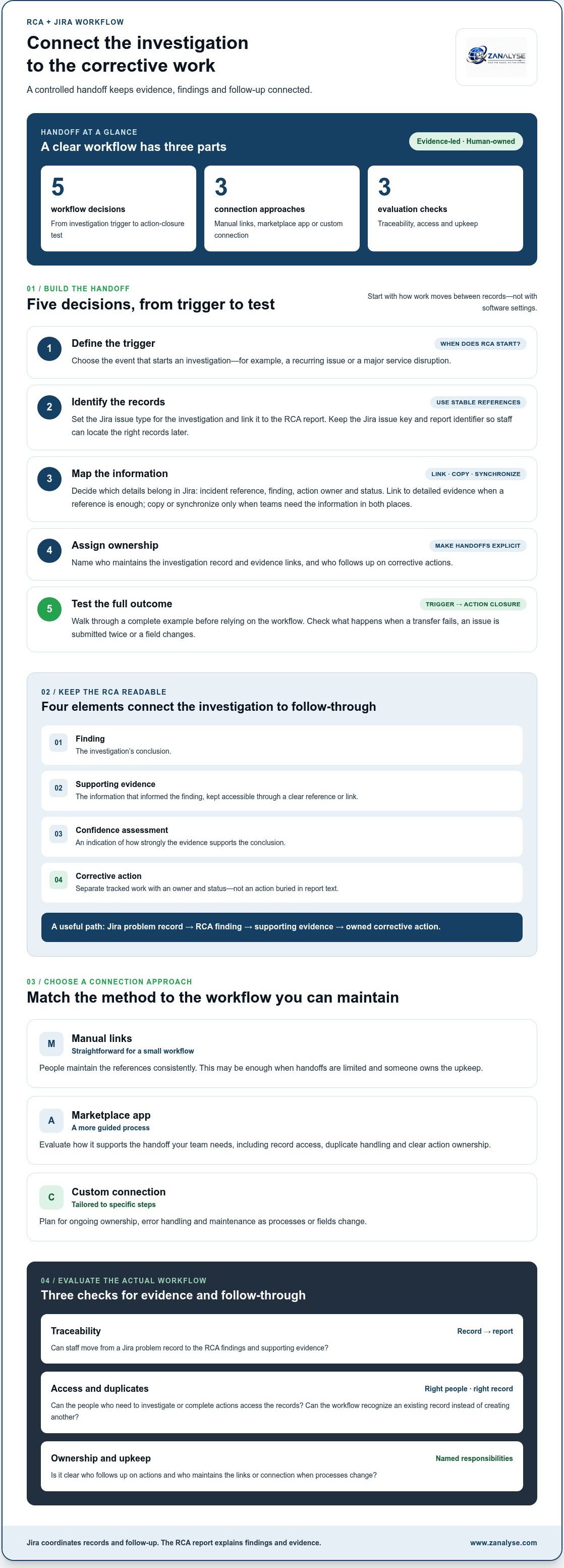
Link each incident or problem record to its RCA report using stable references, such as the Jira issue key and a report identifier. Keep the parts of the investigation distinct: the finding states the conclusion, supporting evidence shows what informed it, and a confidence assessment indicates how strongly the evidence supports that conclusion. Track corrective actions as separate work items with an owner and status, rather than burying them in report text.
This structure makes the handoff useful to support staff, problem managers, and decision-makers. For example, if a recurring service issue is traced to a configuration change, readers should be able to move from the Jira record to the relevant finding and evidence, then see the action intended to address it. Structured RCA reports that include evidence, confidence scores, and corrective actions give teams clear inputs for this workflow.
Traceable links help teams find previous evidence and findings instead of rebuilding an investigation from scattered records.
How to integrate RCA tools with Jira in a controlled workflow
Start with the handoff, not the software settings. Before integrating RCA tools with Jira, decide what event starts an investigation, which records need to connect, and who is responsible for turning findings into tracked work. This keeps the workflow clear whether your team uses manual links, a marketplace app, or another connection method.
- Define the trigger: Choose when an incident should lead to an RCA, such as a recurring issue or a major service disruption.
- Identify records: Specify the Jira issue type used to track the investigation and how it points to the RCA report. Use stable identifiers so staff can find the right record later.
- Map fields: Decide which details belong in Jira, such as the incident reference, finding, action owner, and status. Link to detailed evidence when a reference is enough. Copy or synchronize information only when teams need it available in both places.
- Assign ownership: Name who maintains the investigation record and evidence links, and who follows up on corrective actions. Make handoffs explicit.
- Test outcomes: Walk through a complete example, from the initial trigger to action closure, before relying on the workflow.
Build the handoff around clear records and ownership
Make timestamps, incident references, evidence links, findings, and action status easy to interpret. Confirm that everyone who needs to investigate or complete actions can access the relevant records. Test what happens if a transfer fails, an issue is submitted twice, or a field changes. Assign someone to review workflow changes so field mappings and ownership do not quietly become outdated. These steps support a consistent root cause analysis process.
Connect the handoff to your organization’s problem-management process: define how incidents become investigations and how findings lead to owned corrective work. A small, controlled test can reveal gaps before the workflow is used across teams.
How to evaluate an RCA-Jira integration for evidence and follow-through
The right approach depends on how much coordination your team needs and can maintain. Manual linking is straightforward for a small workflow, but it relies on people updating references consistently. A marketplace app may provide a more guided process, while a custom connection can be tailored to specific steps and needs clear ongoing ownership.
Compare each option against the work it must support:
- Traceability: Can staff move from a Jira problem record to its RCA findings and supporting evidence?
- Access and duplicates: Do the right people have access, and can the workflow recognize an existing record instead of creating another?
- Ownership and upkeep: Is it clear who follows up on actions and who maintains the link or connection when processes change?
A workable approach should fit team capacity as well as process needs. Manual references may be enough when handoffs are limited and someone owns their upkeep. A more automated pattern may suit repeatable handoffs, provided teams know how errors are handled and who maintains the setup. Assess the actual workflow, not just whether records appear connected.
Where structured RCA reports fit in a Jira workflow
Structured reports give Jira problem records useful material: evidence that supports the analysis, confidence scores that show how strongly findings are supported, and corrective actions that can become tracked work. Plan how the report and Jira record will be linked, and decide which details need to be copied or synchronized. Keeping these decisions clear helps teams maintain the relationship between the investigation and its follow-up.
ZANALYSE uses an automated RCA platform to turn logs, timelines, and incident data into structured reports with evidence, confidence scores, and corrective actions. To learn how this can support your problem-management workflow, explore ZANALYSE’s RCA approach.
Make the next improvement practical
Choose one problem-management workflow as your next step. Define what a useful handoff looks like for the people who investigate issues and those who own corrective work, then use that standard to guide future changes. A clear process gives your team a stronger foundation for integrating RCA tools with Jira without making a technical connection the goal in itself.
ZANALYSE reports that its platform reduces incident lead times by over 50%. This is a claim about the platform, not a result attributed to Jira integration. For teams looking to make root cause analysis more accessible and structured, explore ZANALYSE automated root cause analysis.
Start with a workflow your team can maintain, then build on what it learns. Consistent, well-owned problem management is within reach.
Frequently Asked Questions
Can Jira perform root cause analysis on its own?
Jira can record and coordinate incident or problem work, and teams can document findings there. To make those findings useful, define how investigators assess possible causes and support their conclusions. For example, record whether a suspected cause was tested or remains an assumption so later readers can interpret it accurately.
What information should an RCA report include when linked to Jira?
An RCA report should give readers enough context to understand how its conclusions were reached. Include the incident’s scope and time period, the investigation method, findings, references to source evidence, and corrective actions with their owners and status. For teams working across Canada, Australia, and Europe, use clear time zones for timestamps so readers can interpret event sequences consistently.
Does connecting an RCA tool to Jira make an incident report audit-ready?
No. A connection can help people locate related records, but it cannot verify that evidence is complete or conclusions are sound. Keep source material identifiable, note who prepared or reviewed the report, and preserve a clear record of changes to findings and actions. These practices make an investigation easier to examine later; a tool connection alone does not establish audit readiness.
Do teams need a Jira Marketplace app to link RCA findings?
No. Teams can link findings manually, for example by adding a report reference to the relevant Jira issue. A Marketplace app is one possible option, not a requirement. Choose an approach that staff can use consistently and maintain as workflows change. If links are often missed or handoffs need more structure, evaluate whether an app or another connection method would address that specific gap.
Disclaimer
Some content on this website may be generated or assisted by artificial intelligence. While we strive to ensure that all information is accurate, relevant and up to date, AI-assisted content may contain errors or omissions. Content should therefore be considered informational and not as professional advice.


