


What if the biggest cost of an IT outage isn’t the sale you can see slipping away? For SMB leaders, calculating cost of IT downtime for SMBs starts with your own revenue, staffing, and operating model, not a headline average. An hour offline can stop work, delay it, or shift it into overtime, and each outcome has a different cost.
It’s difficult to prioritize prevention when the estimate is a guess. Build a transparent, repeatable calculation using business data. Separate direct losses from work that can be recovered, then include recovery effort and customer impact. This gives IT directors, process managers, support teams, and decision-makers a practical basis for choosing resilience improvements.
Here’s how to define downtime, identify the right inputs, and refine your calculation after each incident.
Key Takeaways
- Distinguish full outages, partial disruptions, and planned maintenance by how they affect essential business work.
- Make calculating cost of IT downtime for SMBs repeatable by defining the incident scope, duration, and affected work.
- Use business-owned data where available, and label assumptions so estimates remain transparent.
- Use incident evidence to prioritize recovery planning and identify causes worth addressing to prevent repeat disruption.
What IT downtime costs an SMB, and why there is no universal hourly figure
IT downtime occurs when an outage or interruption prevents a system from supporting necessary business work. A full outage may stop an entire operation, while a partial disruption can leave some tasks available and block others. For example, a slow order system might still accept requests but prevent staff from processing them at a normal pace. The Downtime (computing) overview provides general context. For an SMB estimate, focus on how the interruption affects your own processes.
Planned maintenance differs from an unexpected failure, but its operational impact still matters. If maintenance takes a system offline while staff need it, record the affected work and resulting delays. If it happens outside operating hours without disrupting business, it may not create a direct downtime loss. Track planned work separately so it doesn’t distort comparisons with unplanned incidents.
There’s no universal hourly figure. A business that earns revenue through online transactions may lose sales when checkout stops. A professional services firm might have staff unable to access documents, delaying work that can still be delivered later. The affected processes, timing, duration, and time needed to restore normal work all shape the estimate. Calculating cost of IT downtime for SMBs therefore requires business-specific inputs, not just a broad industry average.
Which business impacts belong in a downtime estimate?
Separate immediate losses from costs that may be recovered. Consider lost sales or contribution, staff time spent waiting or catching up, technical recovery work, and added incident expenses. Then distinguish activity that was permanently lost from work completed later. Don’t count delayed work as a full lost sale if the customer still receives the service. Include any overtime or other extra effort needed to finish it. Downtime cost depends on business impact, not outage duration alone.
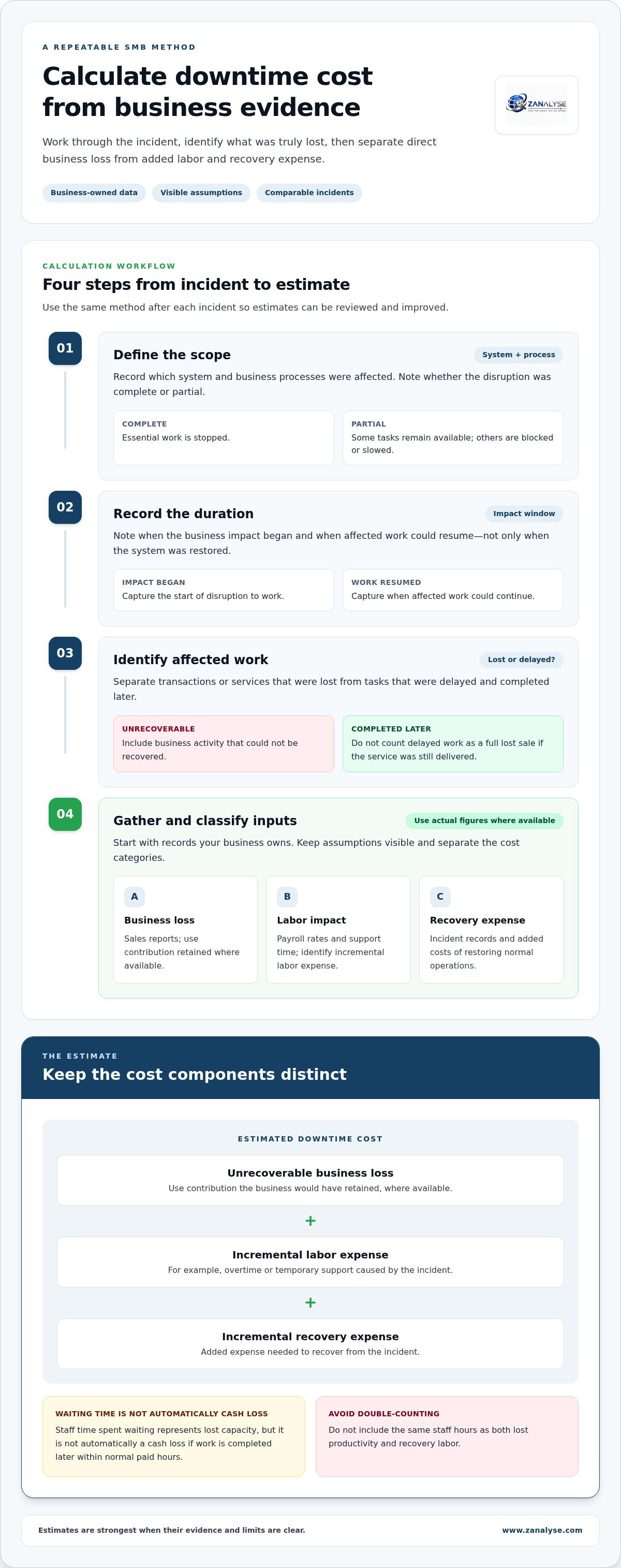
How to calculate IT downtime costs with business-specific inputs
Use the same method after each incident so estimates can be compared and improved. When calculating cost of IT downtime for SMBs, start with records your business owns, such as sales reports, payroll rates, support time, and incident timelines. Mark assumptions clearly. An estimate is most useful when its limits are visible.
- Define the scope. Record which system and business processes were affected, and whether the disruption was complete or partial.
- Record the duration. Note when the impact began and when affected work could resume, not just when the system was restored.
- Identify affected work. Separate transactions or services lost from tasks delayed and completed later.
- Gather and classify inputs. Use actual business figures where available. Keep lost revenue, labor impact, and added recovery expense in separate categories.
A practical downtime cost formula for small businesses
Estimated downtime cost = unrecoverable business loss + incremental labor expense + incremental recovery expense. Estimate lost activity using the contribution the business would have retained, where that figure is available, rather than treating every delayed sale as a total loss. Add labor costs when the incident creates an incremental expense, such as overtime or temporary support. Staff time spent waiting represents lost capacity, but it isn’t automatically a cash loss if the team completes the work later within normal paid hours.
Keep an evidence-based estimate separate from a planning estimate. A calculator such as OutageCost.com Downtime Calculator and Benchmarks can offer comparison context, but your own records should drive the business-specific result. Avoid double-counting: don’t include the same staff hours as both lost productivity and recovery labor.
Once you’ve recorded the estimate, use structured incident learning to organize logs, timelines, and corrective actions. A consistent root cause analysis process can help your team turn findings into practical follow-up.
Turn downtime cost estimates into better incident decisions
A cost estimate is useful when it changes what the business does next. Compare incidents by the processes affected, the work that could not be recovered, and the effort required to restore normal operations. A recurring interruption to order processing may deserve more prevention attention than a longer outage affecting a process with a workable alternative. Use the estimate alongside operational risk and recovery needs, not as the only measure of priority.
After each incident, preserve records that can explain both the technical cause and the business impact. Keep relevant logs, a timeline of events and response decisions, and notes on the teams or tasks affected. This makes it easier to revisit assumptions in calculating cost of IT downtime for SMBs and refine future estimates using evidence rather than memory. For teams operating across Canada, Australia, and Europe, recording the currency and time zone also makes estimates easier to compare across markets.
Use root cause analysis to reduce repeat disruption
Incident learning turns records into a documented account of what happened, why it happened, and what should change. Assign practical follow-up actions, such as reviewing a recovery step or addressing a recurring cause, then track whether each action is completed. A consistent problem-management process helps IT support personnel and process managers share responsibility for that work.
Structured root cause analysis supports learning; it does not calculate financial loss by itself. ZANALYSE is an automated RCA platform that uses logs, timelines, and incident data to create structured reports with evidence, confidence scores, and corrective actions. Teams can use these reports to connect incident findings with business impact and prevention priorities, while keeping the financial estimate grounded in their own business data.
Review the estimate and incident findings together after recovery. If a cause recurs, or affected work proves harder to restore than expected, update the relevant prevention or recovery priority. That closes the loop between measuring disruption and improving how the organization responds.
Make your next incident easier to learn from
A downtime estimate can become more than a record of past loss. Use it as a baseline, then review it after future incidents to see whether business impact and recovery effort are changing. This gives IT leaders and process managers a clearer basis for deciding where to focus improvement work.
For calculating cost of IT downtime for SMBs to support better decisions, pair the estimate with a consistent incident-learning process. ZANALYSE’s automated RCA platform reduces incident lead times by over 50%. Explore how ZANALYSE structures root cause analysis with the Standard License and take a practical step toward turning incident learning into lasting improvement.
Frequently Asked Questions
How much does one hour of IT downtime cost a small business?
There’s no reliable hourly figure that applies to every small business. When calculating cost of IT downtime for SMBs, compare affected activity with your own business records, such as transaction volume during the same trading period. If you operate across Canada, Australia, or Europe, record the currency and time zone used so estimates from different markets can be compared consistently.
Can lost productivity be recovered after an IT outage?
Sometimes, but recovery may shift work rather than erase the impact. For example, a team might clear a backlog the next day by postponing routine tasks. Track which work was completed, which tasks were deferred, and whether staff needed extra hours to catch up. This helps distinguish recovered output from new costs or work that was never completed.
Should planned IT maintenance count as downtime?
Include planned maintenance in operational records if it interrupts business work, but keep it separate from unexpected incidents. A scheduled system update during a quiet period may have little effect, while the same interruption during a busy trading window could delay customer orders. Record the actual effect and whether staff had a workable alternative, rather than assuming every maintenance window caused a loss.
How often should an SMB update its downtime cost estimate?
Review the estimate when a meaningful change affects how the business operates, such as a new sales channel, a shift in trading hours, or a change to a key system. Revisit it after an incident exposes a missing input. Keep dated versions of the estimate and note what changed, so teams can distinguish real shifts in impact from changes in the calculation method.
Disclaimer
Some content on this website may be generated or assisted by artificial intelligence. While we strive to ensure that all information is accurate, relevant and up to date, AI-assisted content may contain errors or omissions. Content should therefore be considered informational and not as professional advice.


