


A recurring IT incident is a signal, not an explanation. Root cause analysis (RCA) in software development is a structured, evidence-led process for identifying the conditions behind a failure rather than stopping at the visible symptom. Root cause analysis software for IT teams helps organize incident records, logs, timelines, and findings so teams can investigate causes and document corrective actions.
A quick workaround may restore service, but it does not explain why the issue happened or how to prevent it from returning. Effective RCA brings the right people together, tests potential causes against evidence, and treats the investigation as an opportunity to learn, not assign blame.
This article explains how teams identify root causes, apply RCA methods and software to investigate incidents, and turn findings into trackable actions. It also covers what makes an investigation useful when problems recur.
Key Takeaways
- Bring the people closest to an incident into the investigation, then assign clear ownership for corrective actions and track whether they address the cause.
- Use validated evidence such as logs, timelines, support records, and incident history to test explanations instead of relying on assumptions.
- Choose an analysis method that fits the problem: repeated “why” questions can explore a simple issue, while cause diagrams can help map contributing factors in a complex failure.
- ZANALYSE Standard License helps IT teams create structured RCA reports from incident data, with evidence, confidence scores, and corrective actions.
What is root cause analysis (RCA) in software development?
In software development, root cause analysis (RCA) is a structured investigation into why an incident occurred. It looks beyond the visible symptom to identify contributing conditions. For example, a failed release may involve unclear requirements, a testing gap, and an issue in the deployment workflow. The goal is to learn from evidence, not assign blame.
Good collaboration brings developers, testers, support staff, and business analysts into the RCA process. People closest to the work can explain details that incident records miss. Keep discussion focused, agree on the problem statement, and compare each proposed cause with evidence. Effective brainstorming often works best in groups of 5-10 people.
Cloud, network, and application incidents require different evidence. A cloud investigation may examine service events and change timelines; a network review may focus on connection records, while application analysis can draw on logs, performance metrics, and user feedback.
Root cause analysis software for IT teams should organize incident evidence, guide a consistent investigation, and produce a clear report. Look for features that connect timelines, logs, and incident records, and let teams document confidence in their findings. A useful tool also supports corrective and preventive actions, with named owners and progress tracking.
Turn findings into corrective actions that address causes, not just symptoms. For example, assign a workflow change to an owner, record the expected result, and review progress against an agreed measure. Follow-up should confirm whether the fix prevents recurrence and introduces new risks. Mobile evidence capture can help staff record observations at an incident location; review actions later with the responsible team. This keeps ownership visible across process managers, IT support, and service providers.
RCA software for investigating incidents and recurring problems
In 2026, strong RCA tools help teams organize evidence, test potential causes, and document findings. For cloud, network, and application incidents, choose workflows that match each system’s records and failure patterns.
Incident Alerts and Data Gathering
Alerts help teams detect an incident and establish when its effects began, but they show symptoms, not necessarily causes. Compare alert times with service changes, performance metrics, traces, and user reports to build a visual sequence. Then identify which events align with the failure and where further investigation is needed.
Look for a structured process that turns alerts into investigation records rather than isolated notifications. A clear RCA investigation workflow can help teams move from detection to documented findings.
Incident Data Collection
Gather records that establish the incident’s context: timelines, support tickets, project documentation, handoff notes, and prior incident history. Validate the data before drawing conclusions, since missing or inconsistent records can point investigators toward the wrong potential causes. For audit reviews, preserve the links between incident records, evidence, decisions, and corrective actions.
Assess whether the tool can bring incident and audit information into one structured review. This supports a deeper investigation without treating every record as a separate case.
Real-World IT Incident Examples
For a cloud service failure, compare provider event records with deployment changes and the affected service timeline. For a network outage, map connection failures against user reports and service impact. For an application slowdown, trace request flows and compare performance measures across affected components.
These examples show why useful RCA software should let teams record potential causes, compare recurring failures, and capture findings in a visual report. Choose tools that connect evidence to actions and retain the record for future incident reviews.
Root cause identification and analysis
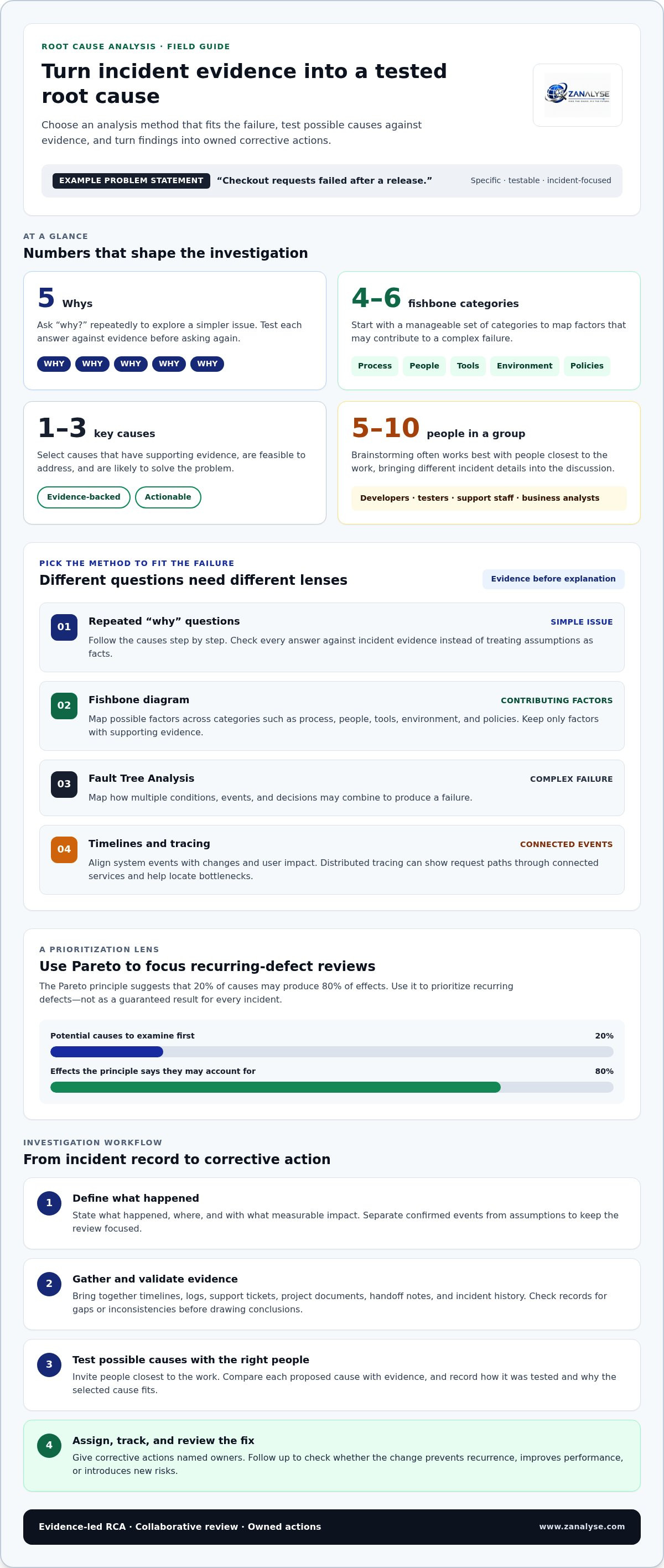
Start with a problem statement: what happened, where, and with what measurable impact. “Checkout requests failed after a release” gives investigators a testable starting point. Separate confirmed events from assumptions before proposing causes. A clear statement keeps the investigation focused on the incident, not broad symptoms.
The 5 Whys method uses repeated “why” questions to examine a problem’s causes. For example, ask why checkout requests failed, then test each answer against evidence before asking why again. The Pareto principle offers another lens: it suggests 20% of causes may produce 80% of effects. Use it to prioritize recurring defects, not to treat the ratio as a guaranteed result.
When causes may interact, map them with a fishbone diagram. Start with four to six categories, such as process, people, tools, environment, and policies. Then assess which factors have supporting evidence. Choose one to three key causes that are both feasible to address and likely to solve the problem. Fault Tree Analysis can map how multiple conditions, events, and decisions combine into a complex failure.
Match the method to the incident. Distributed tracing can show how requests move through connected services and help locate bottlenecks. Timelines align system events with changes and user impact. For a recurring application defect, compare earlier incidents and record what changed before each failure. This can help distinguish a repeated symptom from a shared underlying cause.
A root cause should explain the evidence consistently. Record how each cause was tested, why the selected cause fits, and which actions address it. Then review whether the change prevents recurrence, improves performance, or creates new risks. Structured analysis software can help engineers capture findings and make investigations easier to repeat. Explore structured RCA workflows to support consistent investigations.
ZANALYSE: ZANALYSE Standard License
ZANALYSE Standard License gives teams a structured way to investigate incidents and document recurring causes. ZANALYSE guides users through established RCA techniques and generates reports from logs, timelines, and incident data, including evidence, confidence scores, and corrective actions.
Its browser-based workflow supports process managers, IT support personnel, IT leaders, product managers, and service providers who need to share problem-management work across teams. Included RCA capacity helps staff contribute to investigations instead of routing every analysis through a small group of specialists.
Teams can also choose the ZANALYSE Full License, annual or multi-annual price plans, and RCA Capacity Top-ups. Select the option that suits how your organization plans to conduct and document RCA work. Explore ZANALYSE Standard License and other options to find a fit for your investigation process.
Make the Next Investigation a Starting Point
Use the next recurring incident to define how your team wants problem management to work. Agree on who can open an investigation, how findings are recorded, and who reviews proposed changes. A shared approach lets process managers, IT support, and service providers contribute without routing every decision through one specialist.
Choosing root cause analysis software for IT teams is one part of that change. Consider whether people closest to each incident can follow the workflow, and whether leaders can see ownership and follow-up. Start with a process the team can apply consistently, then refine it as investigations reveal gaps.
Contact ZANALYSE about your RCA needs and take the next step toward more consistent problem management.
Frequently Asked Questions
How does RCA software compare to Excel or templates?
RCA software guides investigations, while Excel and templates leave more process control to each user. A spreadsheet can suit a small team documenting occasional cases, but fields and follow-up may vary between files. For teams across Canada, Australia, and Europe, shared templates can align case records. Agree on common terms and ownership before comparing findings across regions.
How long does it take to implement RCA software?
RCA software implementation often takes weeks rather than months. The rollout timeline is shaped by how quickly teams agree on investigation steps, assign process ownership, and organize incident records. Start with a defined group and a repeatable case workflow, then expand access as staff learn how to open, review, and close investigations consistently.
How much time does RCA software actually save?
RCA software can save teams 2-5 hours per investigation. To assess the result in your organization, record the time spent gathering information, coordinating reviews, and preparing reports before adoption. Compare those tasks across similar cases afterward. Track time separately from corrective-action work, so the measure reflects investigation effort rather than all incident resolution.
Is using AI for RCA actually a good idea?
AI can support an RCA, but practitioners should assess the evidence and make the decisions. Use it to organize case information or surface potential connections, then verify each suggestion against incident records and system behavior. For example, an apparent link between a change and an outage needs timeline evidence before the team treats it as a cause.
What ROI should I expect from RCA software?
A market benchmark describes returns of 10-20× or more relative to annual software cost when organizations use RCA software consistently. Build your own assessment from investigation hours recovered, recurring incidents addressed, and the cost of maintaining the process. Record the assumptions behind each measure, then review them against actual usage and completed corrective actions.
Disclaimer
Some content on this website may be generated or assisted by artificial intelligence. While we strive to ensure that all information is accurate, relevant and up to date, AI-assisted content may contain errors or omissions. Content should therefore be considered informational and not as professional advice.


