

An incident record is not the same as operational resilience during a disruption. Incident management software captures what happened and the actions taken. Operational resilience incident reporting software supports coordination and reporting during an event and connects the response to recovery planning. For Australian organisations, choosing the right software starts with identifying which of these needs you want to address.
Both approaches help teams bring structure to disruption. The key difference is whether the main focus is documenting and investigating individual cases or coordinating a live response across critical operations, teams and service providers.
This comparison explains how the approaches differ and how forms, dashboards, workflows and platform capabilities affect day-to-day use. Use it to decide what your teams need to record, manage and learn from incidents.
Key Takeaways
- Match the system to the work: recording and investigating incidents calls for different capabilities than coordinating a response as it unfolds.
- Design forms, dashboards and workflows around clear case states so teams can move reports through review, investigation and approved closure.
- Assess whether resilience capabilities connect critical operations, recovery plans, service providers and live incident information.
- Use ZANALYSE Standard License when you need to help IT staff investigate root causes and create structured reports from incident data.
What is the difference between an incident management system and a full operational resilience platform?
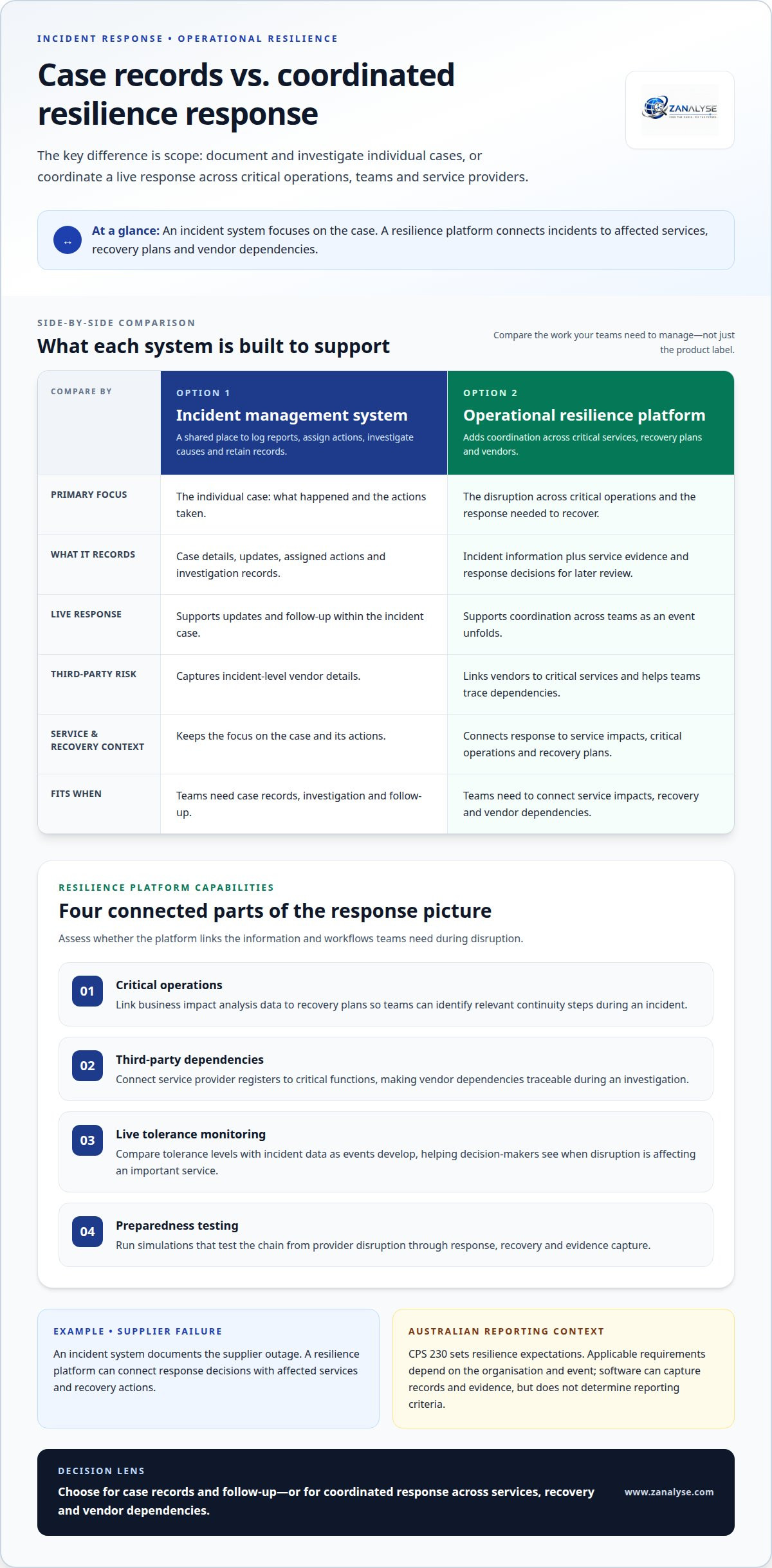
An incident management system records cases and the actions taken. A resilience platform also connects live response with critical operations, recovery plans and third-party risks.
In Australia, APRA Prudential Standard CPS 230 requires a risk management framework covering governance, risk assessments, internal controls and business continuity planning. The applicable requirements depend on the organisation and event.
CPS 230 sets resilience expectations, while incident notification deadlines depend on the applicable APRA reporting rule and event. ASIC and Privacy Act reporting are separate considerations; software can capture records and evidence, but it doesn’t determine whether an event meets reporting criteria.
Incident System Capabilities and Limitations
An incident management system gives teams a shared place to log reports, assign actions, investigate causes and retain records. Its focus is the case. A resilience platform adds coordination across critical services, recovery plans and vendors, helping teams assess disruption beyond an individual incident.
For example, teams can log a material supplier failure as an incident, then link it to affected services and recovery actions. In a hypothetical case, the incident system documents the supplier outage, while the resilience platform connects response decisions with service impacts and evidence for later review.
| Option | Records | Live response | Third-party risk |
|---|---|---|---|
| Incident management system | Case and actions | Case updates | Incident-level details |
| Resilience platform | Incident and service evidence | Cross-team coordination | Links vendors to critical services |
Data Residency and Vendor Coverage
Software can support reporting workflows, but Australian data residency depends on where a vendor stores and processes information. Privacy controls also depend on how access, retention and evidence are managed. Compare deployment locations, data handling, reporting features and your organisation’s privacy requirements.
Providers serving Australian organisations may be local or international. Assess their capabilities against your needs rather than choosing by location alone. For third-party risk management, map each vendor to the services it supports, record dependencies and assign owners to review material changes.
Choose incident management software for case records and follow-up. Choose a resilience platform when your response needs to connect service impacts, recovery and vendor dependencies.
Incident forms, dashboards and workflow customisation
Structured forms capture consistent details, dashboards turn records into useful views, and defined workflows give each case a clear owner and next step.
Incident Forms and Dashboard Customisation
A form should capture the information needed to assess an event, such as the affected service, impact, time, evidence and assigned owner. For example, an IT support report about a failed business application can route details to the team responsible for that service.
Dashboards can group cases by status, impact, service or owner. An enterprise team may need an overview across departments, while a process manager may need a focused queue of investigations and overdue corrective actions. Tailor fields and views to the decisions people actually make.
Replacing spreadsheets with a shared workflow reduces reliance on separate files and manual handovers. Map existing columns to form fields, then assign owners for review and follow-up. For example, bring a spreadsheet’s incident description, service name and action status together in one case record. Keep open actions visible, including their current owners.
Incident Workflow and Case States
Use clear case states to show progress: receive a report, review it, investigate, assign corrective action, verify the result, then approve closure. Each transition should identify who acts next and what evidence supports the change. A workflow governs these steps; a dashboard displays status.
For example, an investigator should not close a case while corrective actions remain unverified. Give the action owner a defined task, record the evidence and route the case for approval. During a regulatory review, the sequence from initial capture through closure is then clear, without reconciling disconnected notes.
Teams strengthening investigation practices can explore structured root cause analysis workflows alongside incident capture.
Operational resilience platform capabilities
A resilience platform connects incident response to the services an organisation must keep operating. If a cloud provider outage disrupts a payment service, for example, teams need to see the service impact, response actions and recovery options together.
Assess the platform against four connected capabilities:
- Critical operations: Link business impact analysis data to recovery plans, so teams can identify the relevant continuity steps during an incident.
- Third-party dependencies: Connect service provider registers to critical functions. If a vendor supports a key customer service, leaders can trace that dependency during an investigation.
- Live tolerance monitoring: Compare tolerance levels with incident data as events develop. This gives decision-makers a clearer view of when disruption is affecting an important service.
- Preparedness testing: Run simulations that test the chain from provider disruption through response, recovery and evidence capture.
Live coordination should direct teams while recording decisions and actions as they happen. A service owner can assign a recovery task, for example, while governance teams retain the decision trail for review. Unlike a record assembled after the event, connected information helps leaders see what is happening and what needs action.
Integration needs clear ownership, too. Define which system is the source of truth for incident records, then set a rule for updates across connected systems. Record failed synchronisations and assign someone to review them each day. Before rollout, define success measures and introduce the programme in stages, reviewing the first group’s cases before adding another.
To make investigation and root cause analysis more accessible across IT teams, explore structured root cause analysis.
ZANALYSE: ZANALYSE Standard License
ZANALYSE Standard License gives IT teams a structured way to investigate incidents and identify root causes. Use it when incident records need to lead to evidence-based findings and corrective actions, rather than stopping at a timeline of events.
ZANALYSE guides users through established root cause analysis techniques and generates reports from logs, timelines and incident data. Reports include evidence, confidence scores and corrective actions, helping problem managers, IT support teams and service providers build consistent investigation practices. Its included RCA capacity helps distribute problem management across IT staff, reducing reliance on a small group of specialists.
Choose the Standard License to make structured investigations accessible across your team. ZANALYSE also offers a Full License, annual or multi-annual plans and RCA Capacity Top-ups.
Contact ZANALYSE to discuss how structured root cause analysis can support your incident investigation workflow in Australia.
Make your next step a practical one
When comparing operational resilience incident reporting software in Australia, make the evaluation practical: identify which teams need to investigate recurring issues, what evidence they must retain and who owns follow-up. Then assess whether each approach supports those responsibilities without adding unnecessary process. This shifts the discussion from feature lists to the operational habits your organisation needs to strengthen.
For teams prioritising structured root cause analysis, ZANALYSE offers Standard and Full Licenses with annual or multi-annual plans. Agree how investigation findings will inform service improvement and how progress will be reviewed. Choose the scope that fits how your team will use investigation and reporting, then contact ZANALYSE to discuss the next step.
Contact ZANALYSE to discuss your needs. A clear starting point can help your teams build more consistent problem management over time.
Frequently Asked Questions
What is Incident Reporting Software?
Incident reporting software gives people a consistent way to submit and manage records of problems, disruptions or near misses. A support analyst, for example, can report a failed service, attach relevant details and route the case to the responsible team. This creates a useful record for review, trend analysis and follow-up, rather than scattering important context across emails and chat messages.
What does “coordinate, respond and report” mean in practice?
Operational resilience also means assigning response responsibilities, tracking decisions as teams act and retaining a clear account of the event. During an application outage, for example, an incident lead can identify the affected service, record who owns each response task and capture key decisions. After recovery, teams can use that record to explain what happened and identify follow-up work.
What is operational resilience incident reporting software?
For Australian organisations, operational resilience incident reporting software can connect incident records with information about essential services, dependencies and recovery arrangements. It helps teams assess how disruption affects service delivery, not just how to close a ticket. A useful test is whether staff can link an event to the affected operation and identify the recovery action or decision that should follow.
How do operational resilience platforms compare on incident management, reporting, and business continuity features?
Compare platforms by how they support the full response cycle: case ownership, decision records, impact visibility and continuity planning. One tool may focus on support tickets, while another connects disruptions to recovery arrangements and service dependencies. For a practical evaluation, trace a sample event from initial report through leadership review, recovery action and post-incident learning.
What does incident reporting software cost in Australia?
Software pricing depends on the selected product, required capacity, licence scope and billing arrangement. For ZANALYSE, the appropriate price is provided after a quote request; the relevant factors include the licence and any capacity requirements. Compare the cost against the work the software must support, such as investigation, structured reporting and follow-up, rather than choosing on price alone.
Disclaimer
Some content on this website may be generated or assisted by artificial intelligence. While we strive to ensure that all information is accurate, relevant and up to date, AI-assisted content may contain errors or omissions. Content should therefore be considered informational and not as professional advice.


