


The first visible error after a deployment may be a symptom, not the cause. RCA for failed software deployments means examining the evidence behind a failure, identifying its underlying causes, and deciding what to change to reduce the chance of recurrence. A quick rollback can restore service, but it does not explain why the release failed.
That distinction matters when teams need to make sound decisions under pressure. A useful analysis starts with a precise problem statement and tests possible causes against reliable evidence, rather than settling on the first plausible explanation. This guide covers how to investigate a deployment failure, avoid misleading conclusions, and document corrective actions so their effectiveness can be reviewed. It also explains how to choose an appropriate RCA method and involve people who can clarify what happened across development, testing, operations, and the business.
Key Takeaways
- Define the deployment failure by its impact, scope, and time window before investigating possible causes.
- Compare logs, metrics, traces, and change records to test explanations instead of treating the first plausible cause as fact.
- Document corrective actions with owners and completion checks, then monitor whether they prevent the problem from recurring.
- Use ZANALYSE Standard License to guide teams through structured analysis and create reports with evidence, confidence scores, and corrective actions.
Implementing corrective actions and documenting them
Use incident procedures for governance; apply 5 Whys or fishbone analysis to structure investigations. Correct causes and add safeguards, such as updating tests when requirements prove outdated.
-
Implement corrective actions
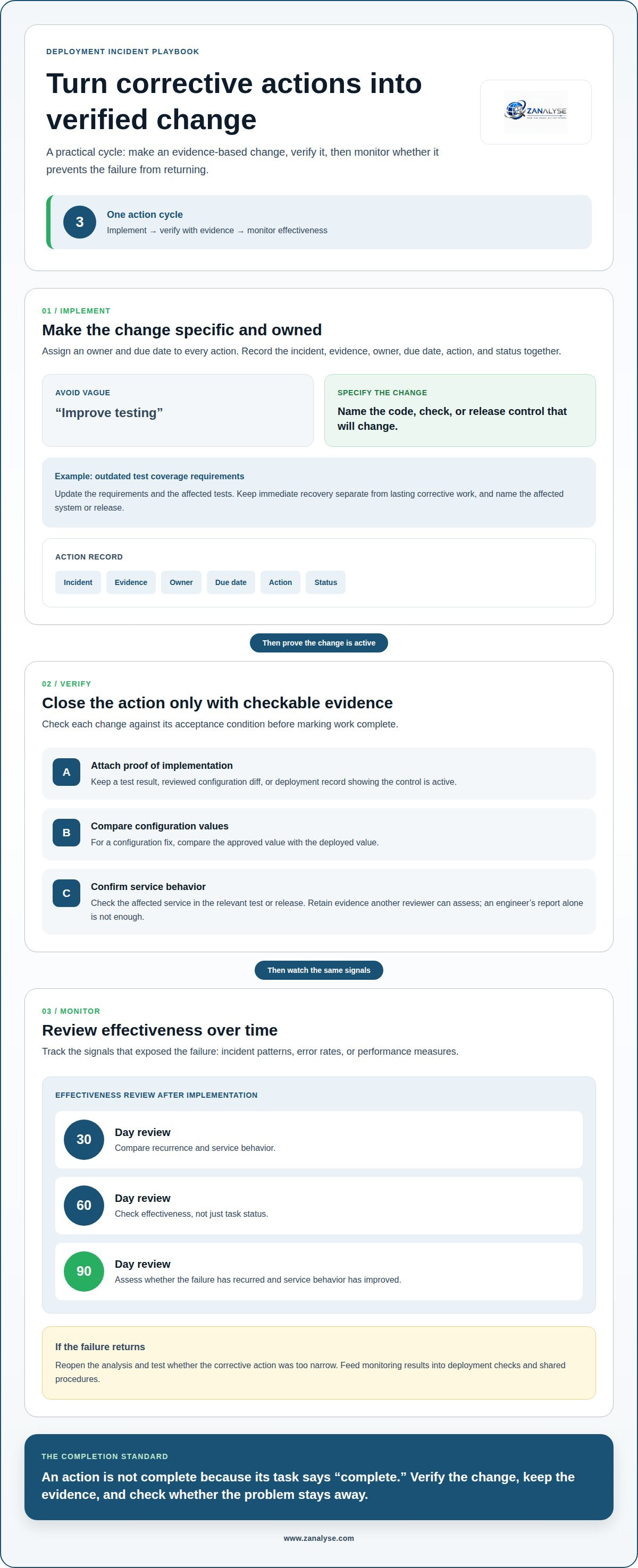
Assign an owner and due date to every action, then implement the evidence-based change. If a deployment regression exposes outdated test coverage requirements, update those requirements and the affected tests. Avoid vague actions such as “improve testing”; specify the code, check, or release control that will change. Record the incident, evidence, owner, due date, action, and status together. Name the affected system or release, and separate immediate recovery from lasting corrective work.
-
Verify corrective action implementation
Verify each change against its acceptance condition before closing the action. Attach a test result, reviewed configuration diff, or deployment record showing that the control is active. For a configuration fix, compare the approved value with the deployed value. Then confirm the affected service behaves as expected in the relevant test or release. Do not mark work complete based only on an engineer’s report; retain evidence that another reviewer can assess.
-
Monitor corrective action effectiveness
Monitor the same signals that exposed the failure, including incident patterns, error rates, or performance measures. Review effectiveness 30, 60, and 90 days after implementation. Compare recurrence and service behavior, not only whether a task reached “complete” status. If the underlying failure returns, reopen the analysis and test whether the action was too narrow. Feed results into deployment checks and shared procedures so engineers can act on what monitoring reveals.
What is root cause analysis (RCA) in software development?
Treat root cause analysis as an evidence-led investigation into why production behavior changed. A rollback restores the previous version; a roll-forward deploys a correction; feature flags disable selected functionality without reverting the entire release.
-
Collect and analyze incident evidence
Gather application logs, performance metrics, traces, and user feedback for the same incident window. Start with the actual symptoms, then compare them with normal production behavior. For example, payment-service 5xx errors appeared about 40 minutes after deployment. Check timestamps and affected services before deciding that the release caused them. Missing or mismatched data can distort the investigation.
-
Analyze release and configuration changes
Compare the active configuration and release records against the last known working state. Focus on changes close to the first symptom, but treat timing as a lead, not proof. In one outage example, a configuration change set the database connection limit to 10 instead of 100. Check who approved the change and whether the deployed value matched its intended setting.
-
Examine log patterns and latency-error correlations
Group log entries by service, error type, and time, then compare them with latency and error-rate metrics. A recurring exception across requests may reveal a shared failure path. If latency and errors rise together, trace the affected requests to test whether they are connected. Correlation narrows the investigation, but it does not establish the root cause without supporting evidence.
-
Map multiple failure conditions
Use fault tree analysis when several conditions may combine to cause an incident. Start with the production failure, then map possible contributing events and their relationships. Mark whether a failure requires all conditions or only one. This technique helps engineers test combinations instead of forcing a single-cause explanation. Tie every branch to evidence from logs, changes, or observed behavior.
A structured RCA workflow can help teams organize evidence and findings.
Avoiding invalid data, premature solutions, and single-cause assumptions
Common deployment failures involve configuration errors, incomplete tests, incompatible changes, or dependency outages. A blameless postmortem should not obscure ownership: record roles, evidence, and follow-up actions.
-
Validate incident data
Compare timestamps, release records, and metrics from the same incident window. Check whether missing logs or delayed telemetry distort the timeline before treating a pattern as proof. For example, match error reports to the deployed version and active configuration. Record data gaps separately from observed behavior so the team does not base conclusions on incomplete evidence.
-
Separate root causes from symptoms
Label each finding as a symptom, potential root cause, or contributing factor. A spike in errors describes what users experienced; it does not explain why the failure occurred. Trace each proposed cause to supporting evidence, such as a configuration change or test result. Do not present a proposed fix, such as extra training, as the underlying cause without evidence.
-
Identify contributing factors
Test multiple explanations when a complex deployment involves several teams or services. A configuration issue may combine with weak test coverage or an overlooked dependency. Map each factor to evidence and explain how it could contribute to the failure. In blameless reviews, name process gaps and decision owners without assigning personal blame. This preserves accountability while keeping the investigation focused on reliability.
-
Examine deployment failure causes
Separate software causes from physical equipment issues when a deployment affects an industrial control panel. Classify loose connections, overheating, power surges, and moisture as equipment-related, not software causes. Also examine vendor dependencies: roughly one in five SRE incidents traces to an external vendor or third-party dependency. Record the service involved and how its behavior contributed to the incident.
Explore structured RCA investigations to organize evidence and contributing factors.
ZANALYSE: ZANALYSE Standard License
ZANALYSE Standard License helps teams investigate deployment failures consistently and document their findings. The platform guides users through established root cause analysis techniques, using incident data, logs, and timelines to create structured reports with evidence, confidence scores, and corrective actions.
Use it when investigations depend too heavily on a few specialists or findings are difficult to share and act on. Its guided process enables IT support staff, process managers, and technical teams to contribute to problem management instead of leaving every analysis to a central expert. This helps make individual incident findings accessible across the organization.
To explore how ZANALYSE Standard License can support your team’s RCA process, contact ZANALYSE.
Turn deployment findings into lasting practice
Make RCA for failed software deployments part of how your team improves its release process, not a document that disappears after an incident. Use each investigation to refine the checks, handoffs, and decision records that shape future releases. Over time, this gives developers, support staff, and decision-makers a shared way to learn from failures and apply that learning consistently.
Start with the point where your current process loses evidence or follow-through. Then decide how a structured RCA workflow could help your team capture findings and turn them into usable actions. Explore ZANALYSE for deployment RCA and consider how it could support your problem-management process.
With a repeatable approach, each deployment issue can inform a more disciplined next release.
Frequently Asked Questions
How long should a thorough RCA take?
A thorough RCA takes as long as needed to test its explanations against reliable evidence. A simple, linear failure with one likely cause may be analyzed in minutes using 5 Whys; a complex incident involving several services requires broader investigation. Set the scope by impact, evidence quality, and unresolved questions, then stop when findings support actionable corrections.
Who should participate in control panel RCA investigations?
Include people who understand the equipment, its operation, and its maintenance. Control panel investigations can involve maintenance technicians, operators, electrical engineers, and reliability engineers. Add an EHS representative when the failure involves safety. For example, operators can explain unusual conditions, while maintenance staff can provide service history to help distinguish an equipment defect from an operating or upkeep issue.
What is root cause analysis for failed software deployments?
RCA for failed software deployments is a structured investigation that connects a release to observed production effects and tests why they occurred. It examines the deployment context, system behavior, and contributing conditions rather than treating a rollback as an explanation. For teams working across Canada, Australia, and Europe, aligning event timestamps helps create one coherent incident timeline.
What deployment failure metrics and data should teams collect?
Collect release identifiers, deployment and configuration timestamps, error rates, latency, relevant logs, traces, and user reports. Compare affected endpoints with unaffected ones to narrow the scope. Preserve a pre-deployment baseline, too: a metric’s change is easier to interpret when teams know its earlier pattern. Include the data source and time window so reviewers can reproduce the comparison.
How do you perform a step-by-step RCA after a failed deployment?
First, define the production impact and incident window. Gather deployment records and system evidence, then compare affected behavior with a baseline. List possible causes, test each against the evidence, and record contributing conditions separately. Finally, assign corrective actions, verify their completion, and review whether the same failure pattern returns. Keep the findings accessible to teams responsible for future releases.
Disclaimer
Some content on this website may be generated or assisted by artificial intelligence. While we strive to ensure that all information is accurate, relevant and up to date, AI-assisted content may contain errors or omissions. Content should therefore be considered informational and not as professional advice.


