

An AWS incident is only as manageable as the evidence and decisions available during response. Cloud incident analysis tools for AWS help teams coordinate containment, review IAM activity, preserve logs, and investigate suspicious access. The right capabilities depend on whether you need to diagnose a service disruption, trace unauthorized access, or coordinate recovery.
Choosing a tool involves more than comparing features. Assess how it fits your AWS environment, supports investigations across relevant services, and helps turn findings into corrective actions. Compare capabilities for initial triage, log retention, response workflows, and account investigations so you can identify what your team needs before an incident occurs.
Key Takeaways
- Prioritize containment and protect useful evidence while reviewing access permissions and log coverage.
- Match response capabilities to the AWS services and application domains involved in an incident.
- Trace suspicious account activity through a clear sequence of events to support compromise investigations.
- Use ZANALYSE Standard License to structure root cause analysis and turn incident evidence into corrective actions.
1. Containment, IAM permissions, and log retention
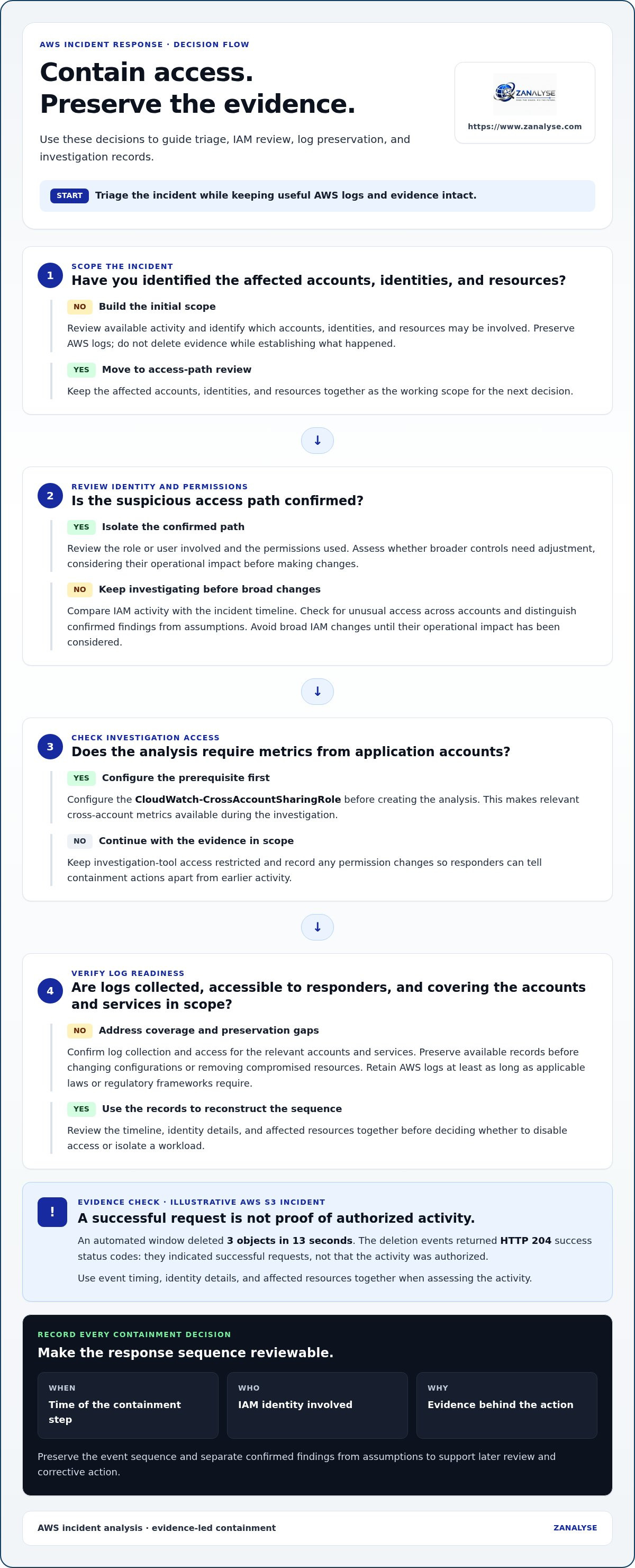
Begin with triage and containment, while preserving AWS logs. Identify affected accounts, identities, and resources, then isolate the confirmed access path and assess whether broader controls need adjustment. Avoid deleting evidence or making broad IAM changes before considering their operational impact.
Review IAM activity alongside the incident timeline. Identify the role or user involved, the permissions used, and any unusual access across accounts. If your analysis requires metrics in application accounts, configure the CloudWatch-CrossAccountSharingRole before creating the analysis. This prerequisite makes relevant cross-account metrics available during the investigation. Restrict access to investigation tools and record permission changes so responders can distinguish containment actions from earlier activity.
Move quickly, but preserve the sequence of events. In an illustrative AWS S3 incident, an automated window deleted three objects in 13 seconds. The deletion events returned HTTP 204 success status codes. Those responses indicated successful requests, not that the activity was authorized. Use the event timeline, identity details, and affected resources together before deciding whether to disable access or isolate a workload.
Prepare log retention before an incident. Confirm that AWS logs are collected, accessible to responders, and cover the accounts and services in scope. Preserve relevant records before changing configurations or removing compromised resources. For each containment step, record the time, IAM identity involved, and evidence behind the action. This creates a useful sequence for later review and helps distinguish confirmed findings from assumptions.
2. Incident-response tools by service, infrastructure, and application domain
AWS-native tools integrate closely with AWS services and provide service-level visibility. Third-party tools can combine AWS evidence with data from other platforms, helping teams investigate across environments.
CloudWatch provides metrics and alarms for service health, while CloudTrail records AWS account activity. Systems Manager supports operational response workflows and runbooks. Configure CloudTrail before an incident and export relevant logs to your analysis tool.
For automated remediation, AWS Systems Manager Automation runbooks can perform defined operational actions. Predefined response plans and runbooks also help AWS experts coordinate recovery from disruptions. Review each action and ensure it is appropriate for the affected service.
Small businesses can start with AWS-native monitoring, activity records, and a focused response workflow. Enterprise teams may need broader correlation across accounts, services, and alerting platforms. Choose according to environment complexity, investigation needs, and how teams coordinate response.
Connect AWS service alerts to the workflow that records ownership, evidence, and response actions. For cross-account metrics, configure the CloudWatch-CrossAccountSharingRole before creating an analysis. Depending on sector and region, GDPR, HIPAA, and APRA CPS 234 may apply. Applicable compliance obligations can shape breach reporting, evidence preservation, and remediation during an incident. Build applicable requirements into playbooks, so response actions support compliance.
Prepare by defining service-specific playbooks, configuring CloudTrail, and testing how alerts reach responders. Retain AWS logs at least as long as applicable laws or regulatory frameworks require. Boards should track mean time to respond or recover, estimated business and operational impact, regulatory exposure and potential penalties, and post-incident improvements implemented. Teams standardizing investigation findings can explore structured root cause analysis.
3. AWS account and environment compromise
Investigating account compromise requires more than listing unusual events. Build a timeline connecting identities, API calls, resources, and changes across AWS accounts. Begin with the first suspicious activity, then trace what that identity accessed or altered. This helps determine whether the event was isolated or affected a wider part of the environment.
In an illustrative AWS S3 investigation, an assumed cross-account role made a ListBuckets API call at 14:31:22 UTC on January 20, 2025. Treat the role assumption as a starting point, not a complete explanation. Review the surrounding activity to determine which account assumed the role, what requests followed, and which resources those requests touched.
A separate AWS CloudFormation example recorded a stack created in the us-east-1 Region at 18:07:12 UTC on September 23, 2025. The session began approximately 50 seconds earlier and was not authenticated with MFA. Correlate the session details with the stack’s creation time and related account activity. This can help investigators assess whether the change fits expected deployment work.
Don’t limit the search to recent events. In one AWS intrusion investigation, threat actors persisted in the environment for a number of years. Review older records where available, and compare access patterns with known roles, deployment activity, and resource changes. Document confirmed actions separately from investigative assumptions, then use the evidence to identify containment priorities and corrective actions. For teams seeking a repeatable way to turn incident evidence into root-cause findings, structure your root cause analysis.
Keep those two incident details distinct in the evidence record: the S3 event timestamp is 2025-01-20T14:31:22Z, while the CloudFormation session was not authenticated with MFA.
ZANALYSE: ZANALYSE Standard License
ZANALYSE Standard License turns logs, timelines, and incident data into structured root cause analysis reports. Use it when AWS investigation findings need to become documented evidence, confidence-scored hypotheses, and corrective actions instead of remaining scattered across notes.
ZANALYSE guides users through established RCA techniques, helping problem managers, support staff, and service providers contribute to analysis. This makes root cause work less dependent on a small group of specialists. Teams with broader requirements can choose ZANALYSE Full License. Annual or multi-annual price plans and RCA Capacity Top-ups are also available.
If your team needs a consistent way to document incident causes and follow-up actions, contact ZANALYSE to discuss the available licence options.
Build a repeatable path from incidents to improvement
Make investigation a shared practice, not a task reserved for a few specialists. Define who records decisions, how teams distinguish evidence from assumptions, and how follow-up actions become part of routine work. A clear process helps technical teams, managers, and service partners learn from incidents together.
When assessing cloud incident analysis tools for AWS, consider how well each option supports that process. Look for an approach teams can apply consistently, with lessons linked to operational improvements after service is restored.
Explore whether ZANALYSE fits your root cause analysis workflow. Explore ZANALYSE for incident analysis and take a practical next step toward more consistent learning from incidents.
Frequently Asked Questions
What are the best cloud incident analysis tools for AWS?
The most useful cloud incident analysis tools for AWS connect detection, event history, and investigation. AWS-native services suit teams focused on AWS, while third-party analysis platforms can help correlate incidents across cloud and application domains. Compare evidence coverage, access controls, workflow fit, and how teams track corrective actions after an investigation.
How much do popular AWS incident analysis tools cost?
Costs depend on log volume, retention periods, metrics and tracing usage, integrations, and software licensing. Map the accounts and services that generate data, then identify what must remain available for investigations. Separate ongoing collection and storage costs from analysis-tool licensing. Teams in Canada, Australia, and Europe can use this breakdown to compare total operating needs rather than treating one tool’s price as the full cost.
Which tools support AWS log analysis, tracing, metrics, and root cause analysis?
AWS X-Ray supports distributed tracing, CloudWatch provides metrics, and CloudTrail records account activity. Combine these sources with relevant application logs for a more complete incident view. ZANALYSE turns logs, timelines, and incident data into a structured root cause analysis report. Compare timestamps and resource scope across sources to connect symptoms with related activity.
What security and compliance risks should organizations consider when using AWS incident analysis tools?
Key risks include exposing sensitive information in logs, granting analysis tools excessive access, and losing evidence through incomplete collection or retention. Review who can view or export investigation data, including across accounts. Organizations operating in Europe, Canada, or Australia should assess relevant privacy and sector requirements for their circumstances, then align access controls, evidence handling, and response records accordingly.
Disclaimer
Some content on this website may be generated or assisted by artificial intelligence. While we strive to ensure that all information is accurate, relevant and up to date, AI-assisted content may contain errors or omissions. Content should therefore be considered informational and not as professional advice.


